
 Login
Login 

Timesheets
Digital Timesheets for Tradies: Ditch Paper and Stay Fair Work Compliant
By Humanz · 2026-05-14

If you’re still running paper timesheets on your jobs, you’re not alone — but you’re also not doing yourself any favours. Paper timesheets get lost, filled in incorrectly, or conveniently forgotten at end of shift. They slow down payroll, create disputes, and leave you exposed if a Fair Work audit ever comes knocking. (Our guide to time and attendance software covers the record-keeping rules in detail.)
Digital timesheets for trades aren’t just a nice-to-have anymore. For Australian construction and trades businesses managing field workers across multiple sites, switching to a mobile timesheet app is one of the highest-ROI admin changes you can make.
This article walks through why paper timesheets fail, what Australian law actually requires, and what to look for when choosing a timesheet app for your trade business.
The problem with paper timesheets on the job site
Paper timesheets seem simple — until they’re not. Here’s what typically goes wrong:
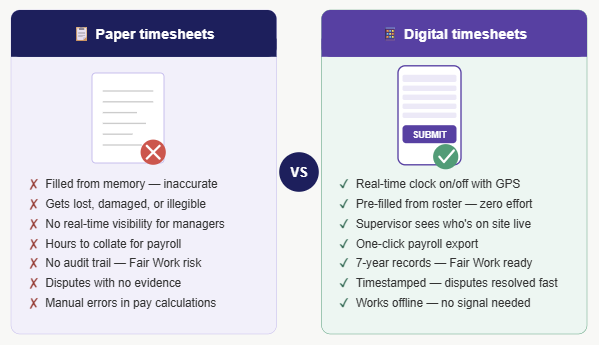
- Workers fill them in from memory at the end of the week, not in real time
- Illegible handwriting leads to payroll errors and wasted time chasing workers
- Timesheets get left on site, in utes, or simply lost
- No way to verify when a worker actually started or finished
- Site supervisors spend Friday afternoons manually compiling hours instead of managing the job
- Disputes about hours worked have no paper trail to fall back on
For a business running 10 or more field workers across different sites, these problems compound quickly. The average time wasted on manual timesheet admin in a construction business is estimated at several hours per week — time that could go straight back to the job.
What Australian law requires for timesheet records
This is where it gets serious. Under Australian employment law, keeping accurate time and wage records isn’t optional.
Fair Work record-keeping obligations
Under the Fair Work Act 2009, employers must keep accurate records of hours worked for every employee. The Fair Work Ombudsman’s record-keeping rules require that time records:
- Show the hours worked each day
- Be kept for a minimum of 7 years
- Be accessible for inspection if requested
- Show overtime hours separately where applicable
Penalties for non-compliance can reach tens of thousands of dollars per contravention. Paper timesheets that are incomplete, inaccurate, or missing create real legal exposure.
The ATO also has requirements around payroll records that align with Fair Work obligations — your timesheet records feed directly into your STP (Single Touch Payroll) reporting. Errors upstream cause problems downstream.
Note: If you run workers under a Modern Award (which most construction and trades workers are), the award may specify additional record-keeping requirements. Check your applicable award on the Fair Work website.
Benefits of switching to digital timesheets
Accuracy and dispute prevention
Digital timesheets captured in real time are far more accurate than retrospective paper entries. When a worker clocks in and out via their mobile, the system records the exact time. If a dispute arises, you have an objective record.
Some platforms also capture location at clock-on, adding an extra layer of verification that the worker was actually on site.
Faster payroll processing
When timesheets flow directly from the mobile app into your payroll or admin system, the manual data entry step disappears entirely. Hours are already totalled, overtime is flagged, and the data is ready to export. For more on connecting these systems, see our guide to payroll integration for workforce management.
For businesses running weekly payroll across 20+ workers, this can save several hours every single week.
Real-time visibility for site managers
With online timesheets for tradies, a site manager can see — right now — who has clocked on, who is late, and who hasn’t shown up. No phone calls, no guessing. That visibility lets you make decisions early, before a no-show becomes a project delay.
Electronic timesheets in construction also help with job costing. When you can see hours per worker per job in real time, you know exactly where labour costs are tracking against budget.
What to look for in a tradie timesheet app
Not all timesheet apps are built for field-based trades work. Here’s what matters most for construction and trades businesses:
- Mobile-first: The app needs to work flawlessly on Android and iOS, including in areas with poor connectivity. Workers shouldn’t need a desktop to submit hours.
- Location on/off: Location capture at clock-in provides accountability without being intrusive.
- Offline mode: Field workers often lose signal underground, in remote locations, or in large structures. The app must record timesheets offline and sync when connectivity returns.
- Pre-filled timesheets: Apps that auto-populate from rostered shifts drastically reduce the time workers spend on admin.
- Approval workflows: Supervisors should be able to review, adjust, and approve timesheets in the app — not via email chains.
- Payroll integration or export: The timesheet data needs to flow somewhere useful — whether that’s a payroll platform or a CSV export for your bookkeeper.
- Compliance-ready records: The system should automatically retain records for the required 7 years and produce audit-ready reports if needed.
The HIA (Housing Industry Association) also publishes guidance on running efficient trade businesses, including managing time records — worth reviewing if you’re in residential construction.
Accurate timesheets are also the foundation of good fatigue management software Australia — without reliable hours data, automated fatigue alerts can’t work correctly.
How Humanz timesheets work in the field
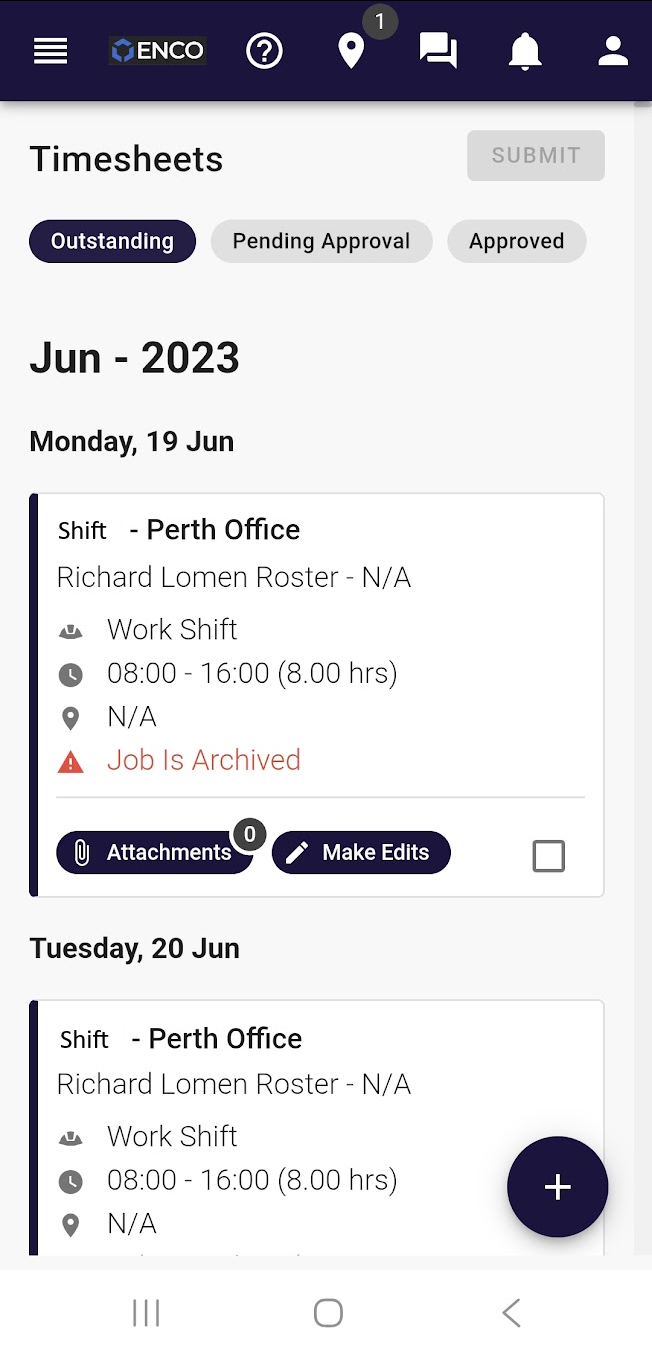
Humanz is a field workforce management platform built specifically for trades and construction teams — not office workers. The timesheet module reflects that:
- Workers clock on and off directly from their mobile
- Timesheets are pre-filled from the roster, so workers just confirm and submit
- Supervisors receive notifications for timesheet submissions and can approve or query from the app
- Hours automatically roll up against jobs and projects for labour cost tracking
- Timesheet records are stored and retrievable for Fair Work compliance purposes
- Works offline — essential for remote sites and underground operations
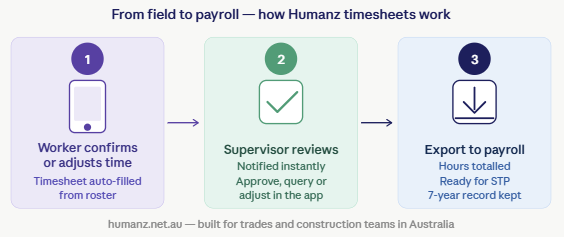
For businesses that have been managing timesheets via spreadsheets or WhatsApp, the shift to Humanz is typically measured in hours saved per week — not just convenience.
Humanz timesheets integrate directly with the rostering module, so shifts, leave, and hours are all connected. No duplicate data entry across systems. For businesses also managing subcontractors, practical scheduling software lets you track subbies’ hours and compliance in the same platform.
Frequently asked questions
Are digital timesheets legally valid in Australia?
Yes. The Fair Work Act doesn’t specify the format records must be kept in — only that they must be accurate, complete, and retained for 7 years. A digital timesheet from a mobile app fully satisfies these requirements, and is generally more defensible than a handwritten paper record.
Can workers submit timesheets from remote sites with no signal?
With the right app, yes. Humanz and several other mobile timesheet apps support offline mode — timesheets are saved locally on the device and sync automatically when connectivity is restored.
Do digital timesheets help with Fair Work audits?
Significantly. If Fair Work investigates a wage underpayment claim, you need to produce accurate time records going back up to 6 years. A digital system with complete, timestamped records is far easier to audit than boxes of paper timesheets — if they even still exist.
What if a worker forgets to clock off?
Most platforms — including Humanz — allow supervisors to manually adjust timesheets, and send workers reminders if a clock-off is missing. The app flags the anomaly rather than silently recording incorrect hours.
How long does it take to set up a digital timesheet system?
For most small-to-medium trades businesses, initial setup in a platform like Humanz takes a few hours to a couple of days. Workers typically adapt quickly — clocking in on a phone is more intuitive than filling out a paper form.
Related articles
Ready to see Humanz on your own roster?
Free 30-minute walkthrough — we'll use your real crews, sites and shift patterns.