
 Login
Login 

Payroll & Leave
Payroll Integration for Workforce Management: Why It Matters and What to Look For
By Humanz · 2026-06-30

For most field-based businesses in construction, mechanical contracting, mining services and trades, payroll is where everything either comes together or falls apart. Hours worked on site have to travel from a roster, through a timesheet, past a supervisor’s approval, and into a pay run — usually across more than one system. Every time that data is re-keyed by hand, you introduce a chance for error, and those errors are expensive in both dollars and trust.
Payroll integration is about closing the gaps in that chain. When your workforce management platform produces accurate, approved time data that flows cleanly into payroll, you spend less time chasing discrepancies, reduce the risk of underpayment or overpayment, and give your team confidence that what they worked is what they’ll be paid. This guide explains why timesheet to payroll accuracy matters in Australia, the role of Single Touch Payroll, and what to look for in payroll integration software.
The Real Cost of Manual Re-Keying
Manual data entry between systems is one of the most common — and most avoidable — sources of payroll error. A supervisor records hours on paper or in a spreadsheet, someone retypes them into a timesheet, and then payroll staff key them again into the pay system. Each hop is an opportunity to transpose a number, miss an entry, or apply the wrong rate.
The costs add up across several fronts:
- Direct labour cost of staff spending hours every pay cycle re-entering and reconciling data
- Overpayments that are difficult or awkward to claw back once they’ve gone out
- Underpayments that erode trust and can trigger complaints to the Fair Work Ombudsman
- Rework when errors are caught late and the whole run has to be checked again
Reducing these starts with getting the source data right. Our guide on cutting out timesheet errors at the source covers the front line of this problem in detail.
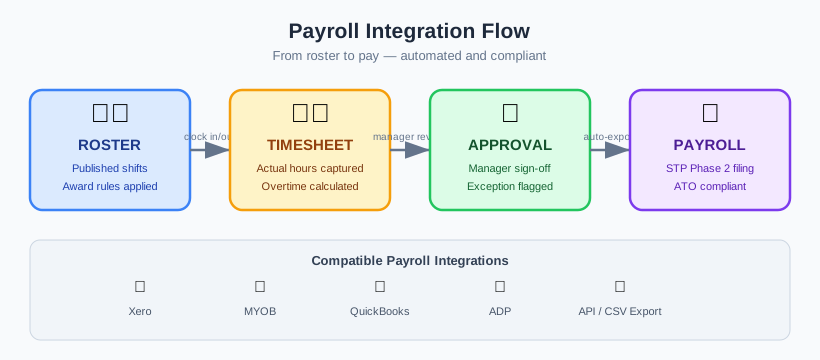
The Roster → Timesheet → Payroll Flow
The cleanest payroll outcomes come from treating rostering, timesheets and payroll as one connected flow rather than three disconnected tasks.
How the flow should work
- Roster — shifts are planned, confirmed and communicated to workers in advance.
- Timesheet — the timesheet is pre-filled from the roster, then reviewed against what actually happened on site.
- Payroll — once approved, that accurate time data feeds the pay run with minimal manual handling.
When the roster is the single source of truth, the timesheet starts from a known plan rather than a blank page. That’s the principle behind pre-filled digital timesheets for tradies — hours that workers confirm, rather than reconstruct from memory. Getting the roster right early with real-time rostering that cuts no-shows means fewer surprises by the time you reach payroll.
Why Accurate Time Data Matters for Award Interpretation
In Australia, gross pay is rarely a simple matter of hours multiplied by a flat rate. Awards and enterprise agreements introduce penalty rates, overtime thresholds, allowances and loadings that all depend on when and how hours were worked.
That means the quality of your time data directly determines whether pay is correct:
- Start and finish times drive overtime and penalty calculations
- Shift patterns affect loadings and break entitlements
- Allowances often hinge on the type of work or site conditions recorded
If the underlying times are wrong or vague, even a perfect payroll engine will produce the wrong number. Fair Work’s pay and wages guidance is the authoritative reference for entitlements, and accurate records are what let you apply it correctly. This is also where compliance and pay overlap — see how the rules play out on the ground in our piece on keeping shift workers compliant with Fair Work.
Single Touch Payroll (STP) and Why It Raises the Stakes
Single Touch Payroll changed the rhythm of payroll reporting in Australia. Under STP, employers report salaries, wages, PAYG withholding and superannuation information to the ATO each time they run payroll, rather than at year end.
A few practical implications follow:
- Errors surface sooner. Because you report every pay event, mistakes are visible to the ATO in close to real time rather than being quietly corrected before an annual report.
- Consistency matters. The data you report needs to line up with your records, so the time data feeding payroll has to be reliable and defensible.
- Audit trails earn their keep. Being able to show how a figure was derived — from roster to approved timesheet to pay — is far easier when the chain is digital.
The ATO’s Single Touch Payroll guidance explains the reporting obligations in full. The takeaway for workforce management is simple: the better your time data, the smoother STP reporting becomes.
What to Look For in Payroll Integration Software
Not all integrations are equal. When you assess workforce management payroll integration in Australia, look past the marketing and check how the data actually behaves end to end.
Data accuracy at the source
The integration is only as good as the data it carries. Look for timesheets that are pre-filled from the roster and then reviewed against actual attendance, so what flows through reflects reality rather than a best guess.
Approvals before anything moves
Time data should be reviewed and approved before it heads to payroll. A clear approval step — with the right supervisor signing off — stops errors at the gate rather than after pay has gone out.
A complete audit trail
You want to be able to trace any figure back to its origin: who recorded it, who approved it, and what changed along the way. This matters for internal confidence and for any external review.
Mapping to pay categories
Hours, allowances and shift types need to map cleanly onto the pay categories your payroll system understands. Good integration respects that structure rather than dumping a flat total and leaving payroll to untangle it.
Visibility across the workforce
Workforce-level reporting helps you spot anomalies before they become payroll problems. Our overview of reading worked-hour patterns across field operations explains how these signals can flag issues early.
Closing the Gap Between Planned, Worked and Paid
The goal of payroll integration is to shrink the distance between three numbers that should agree: what was planned (the roster), what was worked (verified attendance), and what was paid (the pay run).
When those three drift apart, you get disputes, rework and risk. When they stay aligned:
- Variances are visible immediately, not at the end of the cycle
- Conversations about pay are grounded in a shared record
- Reason codes and adjustments are captured rather than guessed at later
Tools like scheduler filters, teams and reason codes help keep the worked picture structured, so the gap between planned and paid stays small. Leave and absences belong in the same picture too — our notes on choosing leave management software cover how time off should factor into accurate pay.
How Humanz Supports Clean Payroll
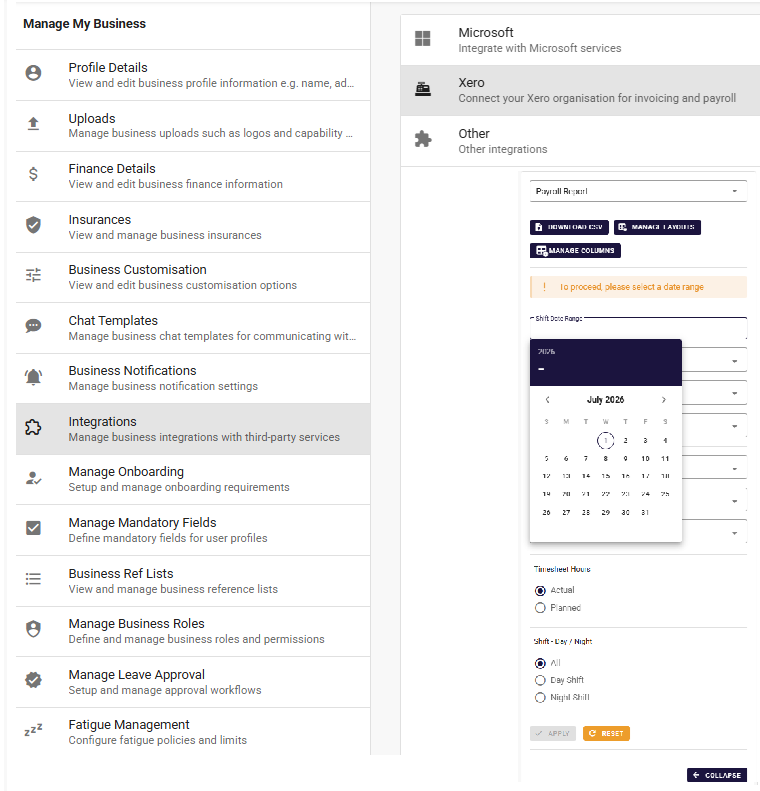
Humanz is an Australian-built workforce management platform built around field operations in construction, mechanical contracting, mining services, drilling and trades. It is deliberately not a payroll engine — it doesn’t calculate gross-to-net, tax or super. What it does is the part that decides whether your pay run is right in the first place: it hands payroll a clean, approved set of worked hours.
In practice, that means every timesheet starts pre-filled from the confirmed roster rather than a blank page, then gets checked against what actually happened on site, so the hours flowing downstream reflect reality instead of memory. Nothing reaches the pay run until the right supervisor has signed it off at an approval gate, and every entry carries an audit trail showing who recorded it, who approved it and what changed — exactly the kind of defensible chain that STP reporting and Fair Work record-keeping reward. Around the edges, custom forms, credential expiry alerts and compliance gates keep the supporting paperwork tidy so it never becomes a payroll surprise later.
The result is a clean, traceable path from roster to approved timesheet to payroll: fewer manual touches, fewer transposed numbers, and a record you can stand behind when a figure is questioned. Humanz integrates with payroll the honest way — by passing over accurate, approved time data in a generic format, rather than pretending to be the system that calculates and pays.
To see how that handover would work against your own pay categories, walk through it with our team.
Frequently Asked Questions
Does Humanz run payroll?
No. Humanz is not a payroll engine. It produces accurate, approved time data — pre-filled from rosters and reviewed against actual attendance — that feeds into your existing payroll system. This keeps responsibilities clear and reduces the manual re-keying that causes errors.
How does payroll integration reduce payroll errors?
By removing manual re-entry between systems. When approved time data flows directly from your workforce management platform into payroll, you eliminate the transposition and omission errors that come from retyping hours. Approvals and audit trails add a further check before anything reaches the pay run.
What is the difference between timesheet to payroll and a payroll system?
A payroll system calculates gross and net pay, tax and superannuation. The timesheet to payroll step is about getting accurate worked hours and allowances into that system. Workforce management software handles the time data; payroll software handles the calculation and payment.
How does Single Touch Payroll affect my timesheets?
STP requires you to report pay information to the ATO each pay run, so errors surface quickly. That raises the importance of accurate Single Touch Payroll timesheets — clean, approved time data with a clear audit trail makes each STP report consistent and defensible.
Why does award interpretation depend on time data?
Penalty rates, overtime and allowances are calculated from when and how hours were worked. If start and finish times or shift types are inaccurate, the award is applied to the wrong inputs and pay comes out wrong — even with a correctly configured payroll system.
Can payroll integration help with subcontractors as well as employees?
Yes. Accurate, approved time records per worker — including subcontractors — give you a consistent basis for payment and reconciliation. Keeping employee and subcontractor records structured the same way makes downstream processing far simpler.
What should I look for first in payroll integration software?
Start with data accuracy at the source, a clear approval step before data moves, a complete audit trail, and clean mapping to your pay categories. Automated approaches such as letting the system build the roster for you can strengthen the upstream data, but accuracy and approvals come first.
Tired of re-keying hours and chasing pay-run discrepancies? Book a Humanz demo and bring a recent timesheet — we’ll show you live how clean, approved hours land in your payroll system.
Related articles
Ready to see Humanz on your own roster?
Free 30-minute walkthrough — we'll use your real crews, sites and shift patterns.