
 Login
Login 

Spreadsheet rosters break long before your business does
Once you're running multiple crews, sites or clients, the spreadsheet-and-phone-calls approach starts costing you real money.
Mornings spent chasing people
Publishing a roster isn't the same as filling it. Without confirmation tracking, you find out about no-shows at 5am — on site.
No single view across sites
One tab per site, one spreadsheet per client — and no way to see who's available, qualified and compliant right now.
Changes that don't reach the field
A shift moves, the spreadsheet updates, and half the crew never finds out. Version-control chaos becomes lost hours.
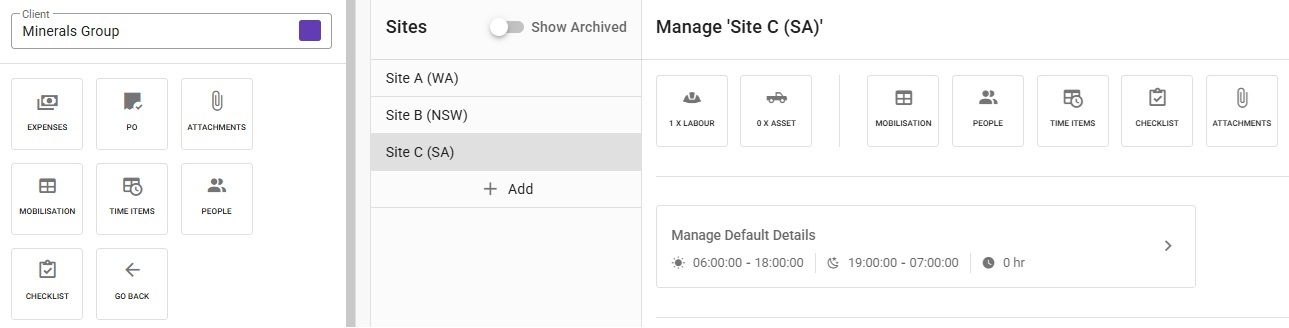
Clients and sites, structured the way you work
Set each client up once with their sites — across any states — and the roster inherits the structure. Every site carries its own default day and night shift times, plus the mobilisation, people, time items and checklists that belong to it.
- Multiple sites per client, across states
- Per-site default day and night shift hours
- Mobilisation, people and checklists attached to each site
- Expenses, POs and attachments held against the client
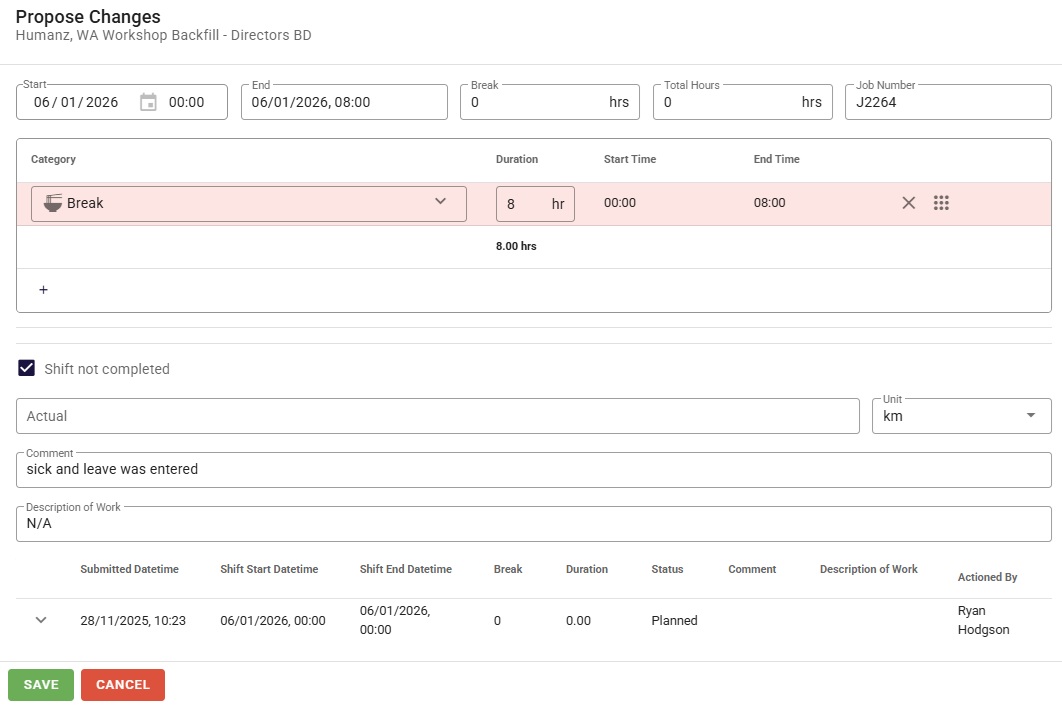
Shift responses with a paper trail
Workers don't just receive shifts — they respond to them. A crew member can propose changes to times and breaks, flag a shift as not completed and explain why, and every submission lands back with the coordinator, dated and named.
- Propose-changes workflow on any shift
- Breaks and hours adjusted against the planned shift
- Comments captured in the worker's own words
- Full history — who submitted what, and when
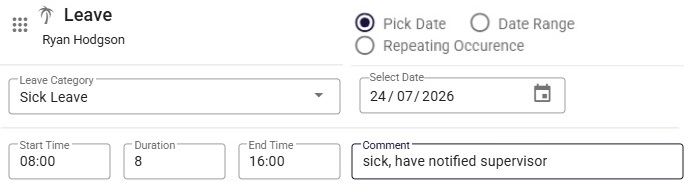
Sick leave that fixes the roster for you
When someone calls in sick, leave is entered in seconds — category, hours, date or repeating pattern, with a comment on record. Tick one box and every shift they held that day is cleared from the roster, so the gap is visible and fillable immediately.
- Sick and other leave categories with times and dates
- Single day, date range or repeating occurrence
- One tick removes all the worker's shifts that day
- Comments keep supervisors in the loop
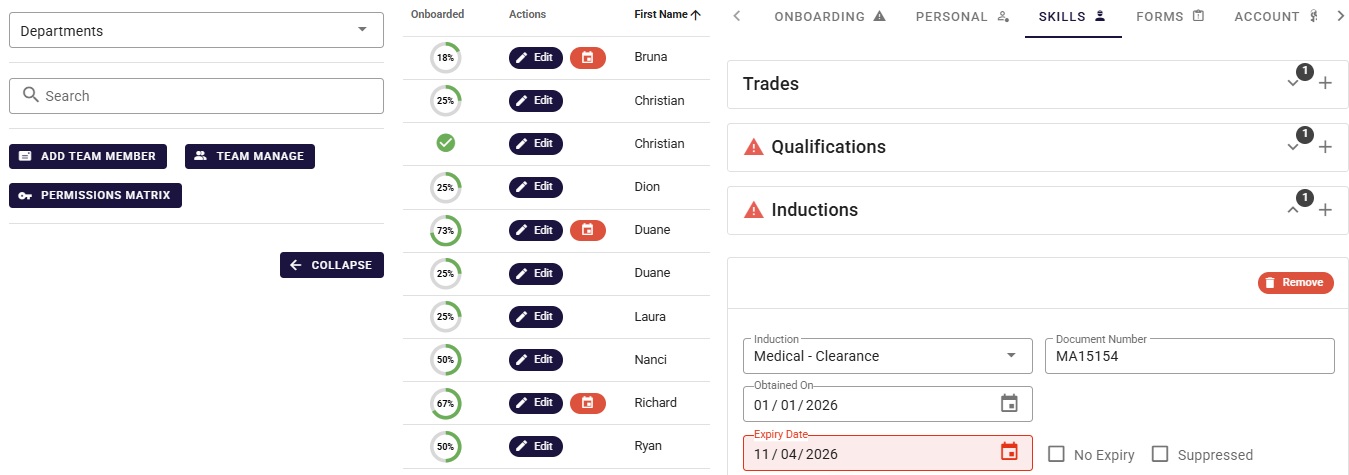
Compliance lives on every crew member
Each person's profile carries their trades, qualifications and inductions — with document numbers and expiry dates. Lapsed or expiring items are flagged red, and onboarding progress shows at a glance, so you know exactly who is roster-ready.
- Trades, qualifications and inductions per person
- Expiry dates flagged before they lapse
- Onboarding progress visible across the team
- Permissions matrix for who can see and do what
Layouts, grouping and exports that suit you
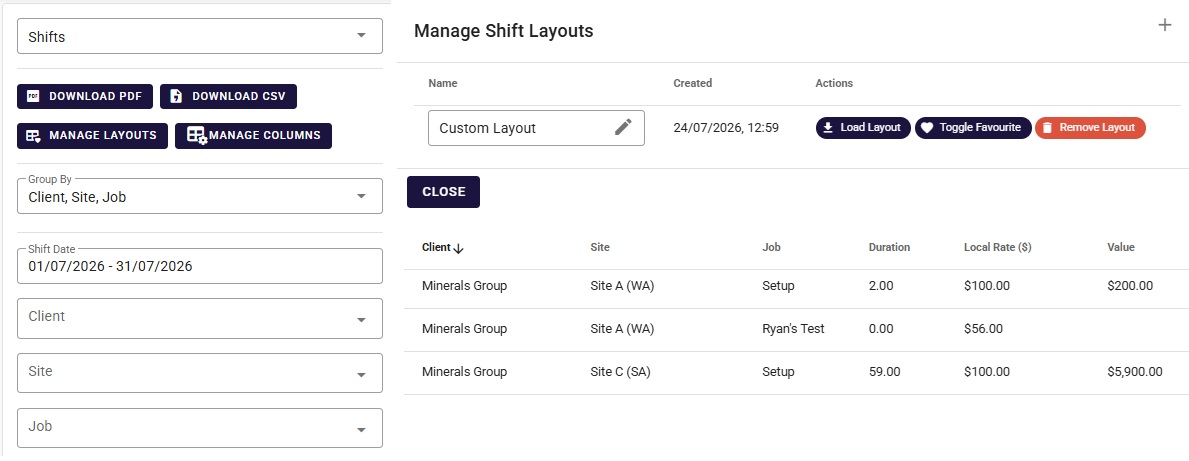
Save the roster views you use most as custom layouts and favourite them. Group shifts by client, site and job over any date range, see rates and dollar values against the work, and hand the result over as a PDF or CSV.
- Saved custom layouts with favourites
- Group by client, site and job over any period
- Local rates and shift values in the one view
- One-click PDF and CSV exports
Award-aware, Australian-built rostering
Generic international scheduling tools weren't built for Australian obligations. Humanz was.
Fair Work & award conditions
Roster with rest periods, maximum hours and shift-worker entitlements in view — and keep records that stand up to an audit.
WHS fatigue obligations
Safe-hour thresholds enforced automatically at scheduling time, across sites and clients.
Licence & ticket currency
High-risk work licences, White Cards and inductions checked before a worker can be booked.
Trusted by hundreds of Australian field & trades businesses


























.png)














































Getting started is simple
We support each step and move at your pace — see our approach for the full rollout picture.
Load your people and sites
Workers, subbies, qualifications and site structures come across with guided setup — no rebuild from scratch.
Build your first live roster
Templates capture your repeating patterns; drag-and-drop handles the day-to-day changes.
Publish to the field
Shifts land on workers' phones with confirmations tracked — and your mornings stop being triage.
Frequently asked questions
What makes rostering software different from a spreadsheet?
A live roster is connected to everything the spreadsheet can't see: worker availability, qualifications, fatigue hours, confirmations and the mobile phones of the people doing the work. Changes propagate instantly, compliance is checked automatically, and you get an audit trail — none of which a spreadsheet can offer.
Does Humanz handle FIFO and swing rosters?
Yes — natively. Swing patterns, rotating nights and back-to-back cycles are first-class citizens, and FIFO flights and accommodation can be attached directly to the roster with templates and bulk uploads.
Can subcontractors be rostered alongside employees?
Yes. Subcontractors are booked from the same scheduling interface as direct employees, each with their own compliance profile — one view of your entire workforce.
Does Humanz use AI to build rosters?
Not yet. Today Humanz uses rules-based automation — templates, live availability matching and compliance gates. AI-assisted scheduling is on our roadmap, and we're building it deliberately on those compliance-first foundations.
How do workers see their shifts?
Through the Humanz mobile app — upcoming shifts, changes, site details and job briefs, plus one-tap confirmation, availability updates, timesheets and leave requests.
How do coordinators fill a last-minute gap?
Live availability shows who's free, qualified and compliant right now, and an open shift can be pushed to all of them at once — the first to accept on their phone gets the job. What used to be an hour of ring-arounds becomes a few minutes, with seen/unseen tracking showing exactly who's across the change.
Guides & further reading
Build your first live roster this week
Book a free demo — bring a recent roster and we'll rebuild it in Humanz live, sites, swings and all.