
 Login
Login 

Compliance
Automated compliance in Humanz — fatigue policies and qualification expiry alerts
By Humanz · 2026-06-12
Automated compliance in Humanz — fatigue policies and qualification expiry alerts
Two compliance failures account for a disproportionate share of audit findings and incidents in trades, construction, and mining: workers rostered beyond safe hours, and workers on site with expired tickets. Both are entirely preventable — and both are almost impossible to prevent manually once you’re scheduling more than a handful of people across multiple sites.
This article covers how Humanz automates both: configurable fatigue policies that flag breaches directly on the schedule, and expiry alerts that chase workers about lapsing training and qualifications so your admin team doesn’t have to.
Fatigue policies — rules that watch the roster for you
Under the model WHS laws, managing fatigue risk is part of your primary duty of care — Safe Work Australia’s fatigue guidance is explicit that work scheduling and rostering are key controls. Different clients and sites often impose their own, stricter rules on top: a mining principal might cap hours harder than your company default.
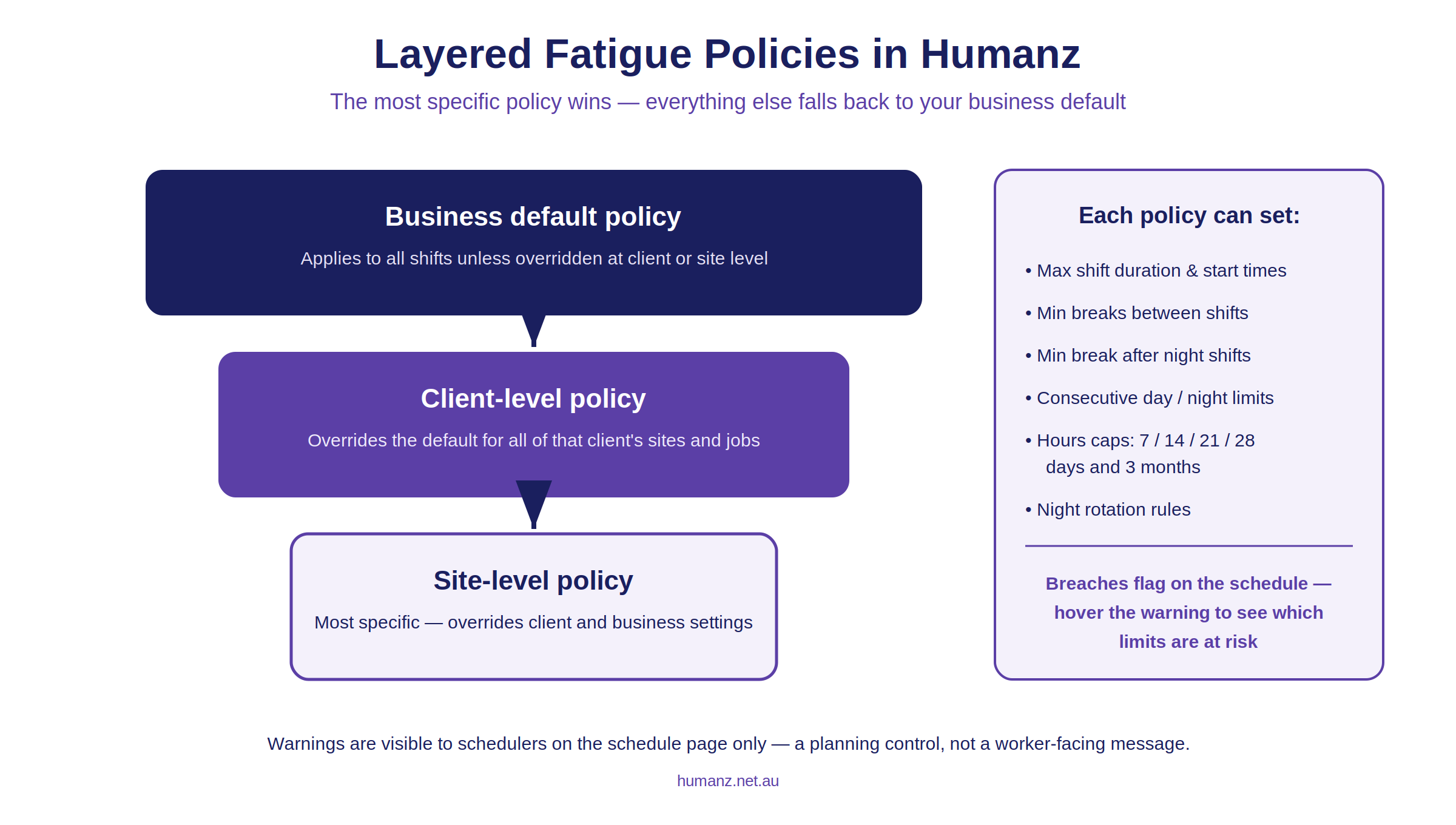
Humanz models this with layered fatigue policies:
- Business default — your baseline policy, applied to all shifts unless overridden.
- Client level — apply a different policy to everything scheduled for a specific client (all their sites at once).
- Site level — the most specific layer, for individual sites with their own fatigue requirements.
What a policy can control
Each policy is built in the Fatigue Management section of your business profile, either from scratch or from a pre-populated template, and can define:
- Shift duration limits — maximum shift length, earliest start and latest start times, and maximum handover time
- Breaks between shifts — minimum rest between shifts, including longer minimum breaks after night work
- Consecutive shift rules — caps on consecutive day and night shifts, and minimum days off after a run of nights
- Rolling hours limits — maximum hours across 7, 14, 21, and 28 days and 3 months
- Night shift rotation rules — controls on permanent night work and rotation direction
Breaches show up where schedulers actually look
This is the part that makes the feature work in practice: fatigue warnings appear directly on the schedule page. When a planned shift would breach the applicable policy, the scheduler sees a warning indicator and can hover over it to see exactly which limits are at risk — for example, hours in the past 7 days against the maximum, or hours over a 3-month window.
Warnings are visible to schedulers only, not end users — it’s a planning control, not a worker-facing message. The scheduler keeps the decision, with the policy doing the arithmetic. This is the same monitoring approach we covered in detail in our guide to fatigue management software in Australia — and it sits at the heart of Humanz’s fatigue management solution.
Qualification and training expiry alerts — stop chasing tickets manually
The second half of the compliance picture is competency. High Risk Work Licences, VOCs, white cards, inductions, medicals — every field business runs a list, and the WHS obligations around licensing and training don’t pause because a spreadsheet wasn’t checked. This builds on the broader practice of tracking qualifications, inductions and credentials across your workforce. Record-keeping duties under the Fair Work system add a parallel paper trail requirement.
Humanz automates the chasing with expiry alerts:
- Enabled with a single toggle in Business Customisations (business-wide setting)
- Workers are notified by email, in-app alert, and push notification
- Alerts repeat every 3 days, and keep going even after the item expires
- Alerts stop automatically the moment the worker updates the document
That last point is the key design choice: the system nags the worker, not your admin team, and it only stops when the problem is actually fixed. Combined with licence and certification tracking, it closes the loop we described in the construction site compliance checklist — capture the ticket at onboarding, track its expiry, and chase the renewal automatically.
Putting the two together
Fatigue policies and expiry alerts cover the two questions every site audit asks: were these people safe to work these hours, and were they qualified to do this work? When both are automated inside your workforce management software, the answer is demonstrable from the system itself:
- The roster shows fatigue rules were applied at the right level (business, client, or site)
- Breach warnings show schedulers had visibility before shifts were locked in
- Qualification records show current tickets, with an automatic alert trail for renewals
For businesses still running these checks in spreadsheets, this is usually the single biggest admin saving when moving to a field workforce management platform — and the biggest reduction in audit risk.
Frequently asked questions
Can different clients have different fatigue rules? Yes. Set a policy at the client level and it applies to all of that client’s sites; set one at site level for individual sites. Anything without a specific policy falls back to your business default.
How to see fatigue warnings? Fatigue warnings are visible on the schedule page, and for planners and schedulers.
How often are expiry alerts sent? Every 3 days, via email, in-app alert, and push notification. They continue after expiry and stop automatically once the worker updates the item.
Can I start from a template instead of building a policy from scratch? Yes. When creating a policy you can start from a pre-populated template and adjust the limits to suit.
Does a fatigue warning block the shift? No — it flags the breach so the scheduler can make an informed call with assessment tools and internal processes. The decision stays with your team.
Want your fatigue rules and ticket tracking running automatically? Book a Humanz demo and bring your current fatigue policy — we’ll set it up live.
Related articles
Ready to see Humanz on your own roster?
Free 30-minute walkthrough — we'll use your real crews, sites and shift patterns.