
 Login
Login 

Compliance
Tracking Qualifications, Inductions, Certificates and Credentials Across Your Workforce
By Humanz · 2026-07-01

Every field business runs on credentials. Before a worker steps onto a site, someone needs to know they hold the right licence, a current induction, the tickets the job demands, and any client-specific clearances. Get it wrong — a lapsed High Risk Work Licence, an expired site induction, a missing White Card — and you are looking at stopped work, a failed audit, or a serious safety incident.
The trouble is volume. Multiply licences, tickets, inductions and competencies across dozens or hundreds of workers and several clients, and the spreadsheet that used to cope starts quietly failing. This guide walks through what field businesses actually track, why manual methods break down, and how qualification tracking software keeps credentials current and your records audit-ready.
The full range of credentials field businesses track
A typical field workforce carries a wide and overlapping set of credentials, each with its own issuer, format and expiry behaviour.
Licences and statutory tickets
- High Risk Work Licences (HRWL) — for crane operation, dogging, rigging, forklift, scaffolding, EWP and similar work.
- Trade and occupational licences — electrical, plumbing, gas fitting and other regulated trades.
- Drivers and machinery licences — including HR/HC/MC classes and plant tickets.
- Verification of Competency (VOC) records — confirming a worker can operate specific equipment to standard.
Cards, inductions and site access
- White Card (General Construction Induction) — the baseline for entering a construction site.
- Site-specific and client inductions — often required before a worker is granted site access.
- Mine site inductions and clearances — common across mining services and drilling work.
- Medicals, fitness-for-work assessments and drug-and-alcohol clearances.
Competencies and training
- Nationally recognised units and qualifications, many of which can be verified against the national training register.
- First aid, working at heights, confined space, and other refresher-based certificates.
- Internal competency sign-offs and toolbox training records.
No two clients ask for exactly the same set, and almost every item on the list expires.
Why expired or missing credentials are such a serious risk
An expired credential is not a paperwork nuisance — it is an exposure. Under the model WHS laws, managing worker competency is part of your primary duty of care, and the national WHS regulator is clear that ensuring workers are appropriately licensed and trained is a core obligation. The consequences of getting it wrong stack up:
- Safety risk — an unqualified or unticketed worker operating plant or doing high-risk work is the most direct route to an incident.
- Stopped or rejected work — clients increasingly check credentials at the gate. A worker who turns up without a current induction is sent home, and you wear the lost day.
- Audit and regulatory findings — when an auditor asks “were these people qualified to do this work?”, you need to demonstrate it from records, not memory.
- Record-keeping obligations — the Fair Work Ombudsman sets out parallel record-keeping duties, and incomplete records create their own exposure.
The risk is rarely a single dramatic lapse. It is the slow accumulation of items that quietly expired because nobody was watching the dates.
Why spreadsheets and memory fail
A spreadsheet works for a handful of workers. It stops working for predictable reasons.
- No one owns the dates. A spreadsheet does not chase anyone — it sits there, accurate the day it was filled in and slowly going stale.
- Updates lag reality. A worker renews a ticket, the certificate sits in an inbox, and the master sheet is updated days later, if at all.
- No link to rostering. The person building the roster cannot see, at the moment they assign a shift, whether the worker is compliant for that site.
- Documents live everywhere. Certificates are scattered across emails, phones and shared drives, so proving compliance means a frantic hunt.
- It does not scale. What works for 10 workers collapses at 100 across multiple clients.
This is exactly the gap that a purpose-built site compliance checklist approach is designed to close — moving from a record someone has to remember to check, to a system that checks itself.
Expiry alerts that chase the worker, not your admin team
The single highest-value feature in any certificate and credential tracking system is automated expiry alerts. Instead of an administrator scanning a spreadsheet, the system watches every expiry and acts before the deadline. Effective licence expiry alerts in Australia share a few characteristics:
- They notify ahead of time, with enough warning to renew a ticket before it lapses.
- They reach the worker directly — by email, in-app message and push notification — so the person who needs to act is the one who hears about it.
- They keep going until resolved, repeating on a cycle and continuing even after expiry, rather than firing once and being forgotten.
- They stop automatically the moment the worker uploads the renewed document.
The design principle is simple: the system chases the worker, not your office. We covered the mechanics in our piece on fatigue policies and qualification expiry alerts, the other half of automated compliance.
Compliance gates that block non-compliant workers from being rostered
Alerts close the loop on renewals. Compliance gates close the loop on rostering — which is where credential tracking earns its place inside a workforce rostering platform rather than a standalone register.
A compliance gate means the qualification check happens at the point of scheduling. When a scheduler tries to assign a worker to a shift, the system can flag — or block — the assignment if the worker is missing a required credential or holds one that has expired. The benefits are immediate:
- The check is unavoidable. Compliance is enforced where the decision is made, not in a separate process someone might skip.
- Mistakes are caught before they reach site, not at the gate when it is too late.
- The roster becomes evidence. Because assignments respect the gates, the schedule itself shows only compliant workers were rostered.
It turns compliance from an after-the-fact audit into a built-in condition of getting on the roster.
Site and client-specific induction requirements
A credential system that only tracks one global list quickly hits a wall, because field work is client-specific. The same worker might need a White Card for every construction site, a particular mine induction for one client, and a separate site clearance for another. Good induction management software handles this layering: different clients and sites can require different credentials, site access can depend on induction status, and requirements are mapped to the work so the right checks attach to the right roles and locations. A worker compliant for one site is not automatically assumed compliant for another.
This mirrors our guide to onboarding software for mining and construction, where client-specific requirements have to be satisfied before mobilisation.
Document storage, version control and audit readiness
Tracking dates is only half the job. You also have to hold the underlying documents and produce them on demand. A proper document portal for field teams provides:
- A single source of truth for every credential, replacing scattered drives and inboxes.
- Role-based access, so workers see their own records and managers see their teams.
- Version control, so when a renewed ticket replaces an old one, the history is preserved rather than overwritten.
- Audit-ready retrieval, so when a client or regulator asks for proof, it is a search rather than a scramble.
We go deeper on this in our guide to running a document portal for field teams. Pairing structured forms with credential capture — via a digital form builder — keeps competency sign-offs and inductions in the same system as the documents.
Capturing credentials at onboarding
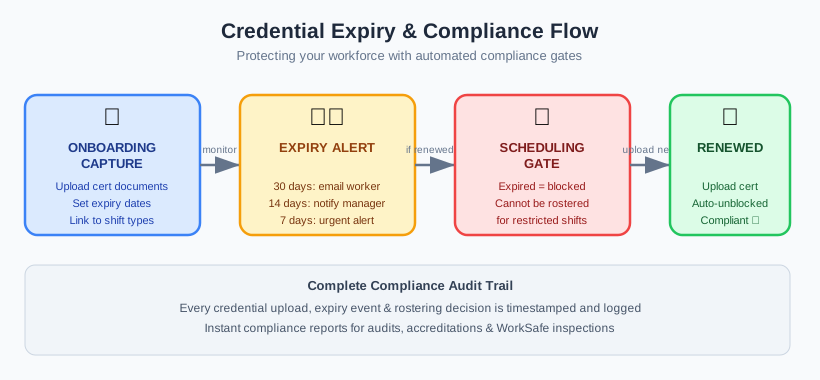
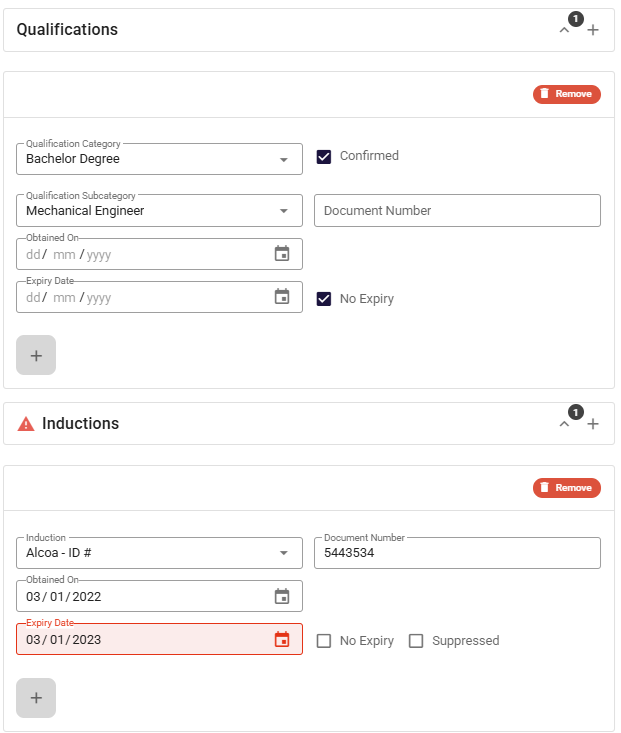
The best time to capture a credential is the moment a worker joins, before they are ever assigned to a shift. Onboarding is where the register gets populated correctly the first time. Capturing credentials at onboarding means documents are collected up front, expiry dates are recorded as they are captured so the alert clock starts immediately, and nothing slips through because the worker is not considered mobilised until the required items are in.
This front-loads the work and prevents the most common failure mode — a worker who has been on the books for months with a gap nobody noticed. Our step-by-step guide on how to onboard field workers walks through fitting credential capture into a fast onboarding flow.
How Humanz keeps credentials current
Humanz is an Australian-built workforce management platform, and credential tracking is wired through the whole system rather than bolted on as a separate register. It starts at onboarding, where licences, tickets and inductions are captured as a worker joins and their expiry dates are recorded straight away, so the alert clock is running from day one. From there, qualification, licence, induction and ticket alerts reach workers directly by email, in-app message and push notification, repeat until the item is renewed, and switch off automatically the moment the updated document lands.
Because that same credential data feeds rostering, compliance gates can flag or block a non-compliant worker at the exact point a scheduler tries to assign them — the check happens where the decision is made. Every certificate sits in a role-based document portal with version control, so renewals replace old tickets without losing the history and a client or auditor’s request becomes a search rather than a scramble. Custom forms round it out, capturing inductions, competency sign-offs and site-specific requirements alongside the documents they belong with. The same tracking extends to contractors too — you can manage subbies and employees in one platform, so contractor tickets and insurances sit under the same expiry alerts and rostering gates.
To be straight about it: none of this leans on AI. Your credential rules, the expiry settings you choose, the alert schedules and the rostering gates all run on logic you configure and can point to in an audit. AI features are on the roadmap, but the credential tracking you rely on today is deliberately rules-based — and that predictability is exactly what makes it hold up under scrutiny.
Tired of finding out a ticket expired only when a worker gets turned away at the gate? Grab a quick Humanz walkthrough and bring your current credential list — we’ll map your licences, inductions and expiry alerts into the platform on the spot.
Frequently asked questions
What is qualification tracking software? It records every licence, ticket, induction and competency your workers hold, tracks expiry dates, and alerts the right people before anything lapses. Better systems also enforce credential requirements at the point of rostering, rather than just keeping a list.
How do licence expiry alerts work? Expiry alerts watch each credential’s date and notify the worker ahead of time by email, in-app message and push notification. Good systems repeat until the item is renewed, keep alerting after expiry, and stop automatically once the updated document is uploaded.
Can different clients or sites require different credentials? Yes. A capable induction management software setup lets you map different credential and induction requirements to different clients and sites, so a worker compliant for one site is not automatically treated as compliant for another.
What is a compliance gate in rostering? A check applied when a worker is assigned to a shift. If the worker is missing a required credential or holds an expired one, the system flags or blocks the assignment — catching non-compliant workers before they reach site.
Why are spreadsheets risky for certificate and credential tracking? A spreadsheet does not chase anyone, updates lag reality, documents end up scattered, and there is no link to the roster. As worker numbers and client requirements grow, the gaps multiply.
Does Humanz use AI to track credentials? No. Humanz credential tracking is rules-based: you configure requirements and expiry settings, alerts fire on schedule, and compliance gates apply at rostering. AI is on the roadmap, but not part of how credential tracking works today.
Related articles
Ready to see Humanz on your own roster?
Free 30-minute walkthrough — we'll use your real crews, sites and shift patterns.