
 Login
Login 

Compliance
What Makes a Good Form Builder: Digital Forms for Field and Site Teams
By Humanz · 2026-06-26

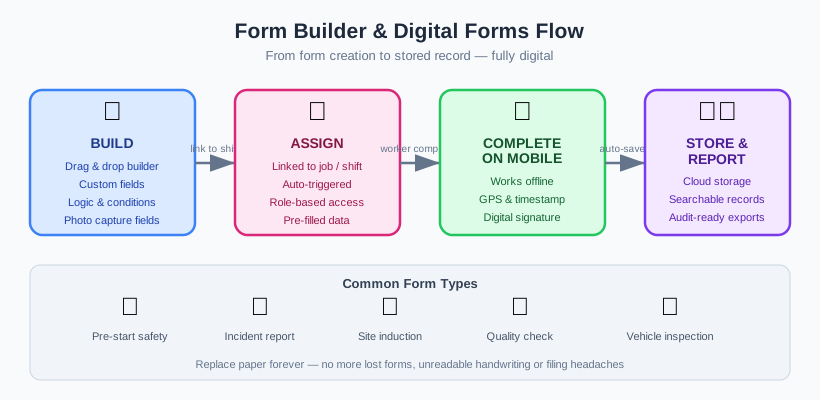
Every field business runs on forms. Prestart checks before plant goes to work, SWMS and JSAs before a high-risk task, incident and hazard reports when something goes wrong, inductions before anyone steps on site. The problem isn’t the forms themselves — it’s how they’re captured, stored and acted on. When that happens on paper or a flat PDF, the information gets stuck in a ute, a glovebox or someone’s email, and the people who need it never see it in time.
This guide looks at what good form builder software actually does for field and site teams. We’ll cover why paper and PDF forms fail on site, the common forms field teams rely on, the features that separate a genuinely useful custom forms app from a digital photocopy, and how to roll new forms out without losing the crew along the way.
Why paper and PDF forms fail on site
Paper forms have one advantage: they work without a signal. After that, the problems pile up fast.
- They get lost. A prestart sheet completed at 6am is no use to anyone if it’s sitting in a vehicle three hours away. Paper has no central home.
- They’re illegible or incomplete. Rushed handwriting, skipped fields, missing dates — there’s nothing forcing a worker to fill in what matters.
- There’s no audit trail. When a regulator or client asks for six months of completed prestarts, finding them becomes a scavenger hunt.
- Data goes nowhere. A pile of incident reports tells you nothing on its own. You can’t spot a trend across 40 forms by flipping through paper.
- They’re slow to action. A hazard reported on paper relies on someone physically carrying it back and re-entering it before anything happens.
PDF forms are often pitched as the fix, but a fillable PDF is just paper with extra steps. It still doesn’t enforce mandatory fields, doesn’t capture a photo of the actual hazard, doesn’t link to the job it relates to, and usually ends up emailed around and saved in five different places. The result is the same compliance gap, dressed up as digital.
For field operations, the real goal isn’t “going paperless” — it’s making sure the right information is captured properly, reaches the right person, and can be found again. That’s what a properly built digital forms platform for site crews delivers.
The common forms field teams rely on
Most field and site businesses are running the same core set of forms, regardless of trade. Getting these right covers the bulk of day-to-day compliance.
Prestart checks
Daily plant and vehicle prestarts, site prestarts and pre-task checks. These are high-volume, repetitive, and the most obvious candidate for mobile prestart checklist software — short forms completed quickly, often before there’s good connectivity.
SWMS and JSAs
Safe Work Method Statements and Job Safety Analyses for high-risk construction work. The regulator sets clear expectations for when a SWMS is required and what it must contain — Safe Work Australia’s SWMS guidance spells it out. Digital SWMS and JSA forms make it easier to confirm the right workers have read and signed before work starts.
Incident and hazard reports
When something goes wrong — or nearly does — you need a record captured at the moment, with photos and location. Digital incident and hazard forms in Australia are increasingly expected by clients and principal contractors, not just regulators, and the model WHS framework underpins most of these obligations.
Inductions and sign-offs
Site inductions, toolbox talk acknowledgements, policy sign-offs and competency confirmations. These tie closely to onboarding — see our guide on how to onboard field workers for where forms fit in the wider process.
Approvals and quality checks
Leave requests, purchase approvals, quality and ITP sign-offs, and any bespoke process unique to your business. This is where a flexible custom forms app earns its keep — most operations have forms no off-the-shelf template will ever cover.
What makes a good form builder
Plenty of tools let you build a form. Far fewer build forms that work for crews in the field. Here’s what to look for in form builder software.
Ease of building
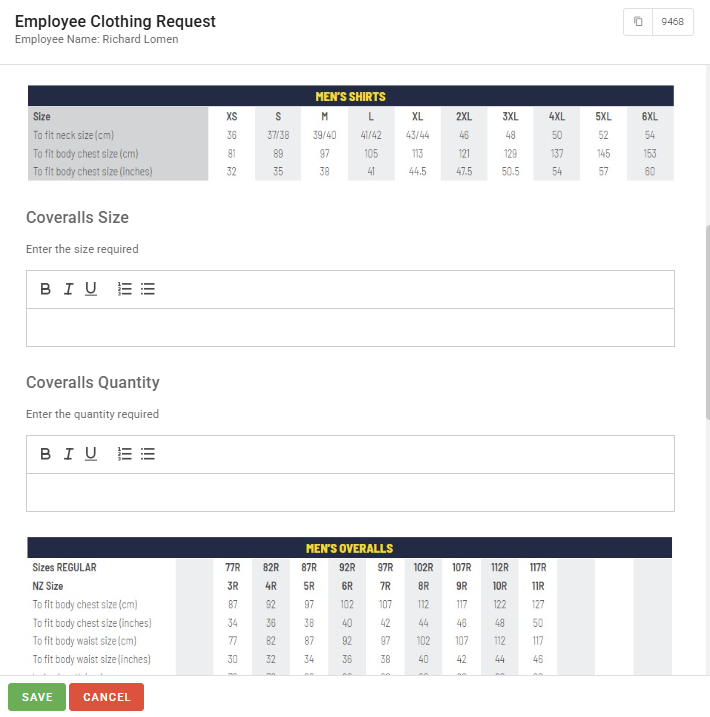
You shouldn’t need a developer to create or change a form. A good builder lets an admin assemble a prestart, incident report or approval from drag-and-drop fields — text, dropdowns, checkboxes, dates, numbers — and publish it in minutes. The easier it is to change, the more likely your forms stay current.
Conditional logic
Real forms branch. If a worker answers “yes” to a defect, the form should reveal a follow-up section asking for detail and a photo. Conditional logic keeps forms short for the common case and thorough when it matters — far better than a five-page form everyone skims.
Photo and signature capture
A hazard report without a photo is half a report. Field forms need to capture images directly from the phone camera and collect on-screen signatures for sign-offs and acknowledgements. This is one of the clearest advantages digital has over paper.
Mobile-first and built for poor connectivity
Site work happens where the signal doesn’t. A genuinely field-ready forms app works on a phone, is quick to complete with gloves on, and lets workers fill in forms offline, syncing automatically once they’re back in range. If a tool needs a constant connection, it will fail on real sites.
Mandatory fields and validation
The single biggest fix over paper: you can stop a form being submitted until the critical fields are done. Mandatory fields, date validation and required photos mean no more blank dates or skipped sign-offs.
Linking forms to jobs, shifts and people
A completed form is far more useful when it’s tied to a job, a shift and the person who submitted it. This is what turns a form library into something you can report on — and it connects forms to your rostering and scheduling rather than leaving them as standalone documents.
Storage, audit trail and reporting
Every submission needs a permanent, searchable home with a timestamp and the submitter’s name — a real audit trail. Beyond storage, you want to analyse what’s coming in: how many hazards this month, which sites generate the most defects, where prestarts are being skipped. That reporting layer is where forms stop being admin and start informing decisions. See workforce analytics for field operations for more on turning field data into insight.
Distribution and visibility
Forms are only useful if they reach the right people. Good systems push the right form to the right crew and surface submissions to supervisors immediately — pairing well with in-app messaging for field teams so a reported hazard triggers an actual conversation, not just a filed record.
Tying forms into the wider compliance picture
Forms don’t exist in isolation. A prestart confirms plant is safe; an induction confirms a worker is cleared to be on site; a SWMS sign-off confirms they understand the task. Each one is a piece of a broader compliance system.
The strongest setups link forms to the rest of your workforce data. Completed inductions feed credential and qualification tracking. Sign-offs become compliance gates that stop someone being rostered to a task they’re not cleared for. Documents referenced in a form — a method statement, a safety data sheet — live in a document portal for field teams the crew can actually reach on their phones. For the full view of what your system should be tracking, our construction site compliance checklist walks through it end to end.
This is also where forms support onboarding. New starters complete inductions, policy sign-offs and competency checks as forms — a flow we cover in detail in our guide to onboarding software for mining and construction.
Rollout tips for new digital forms
The technology is the easy part. Getting crews to adopt new forms is where most rollouts stumble. A few things help.
- Start with one high-volume form. Daily prestarts are ideal — workers fill them in constantly, so adoption builds fast and the payback is immediate.
- Rebuild your real forms, not generic templates. Crews trust a form that looks like the one they already know. Match your existing wording and order first, then improve it.
- Keep them short. Use conditional logic to hide what isn’t relevant. A long form invites tick-and-flick.
- Make the mandatory fields genuinely mandatory. Don’t water down validation to reduce friction — that defeats the purpose.
- Train on a real device, on site. Five minutes on a phone in the yard beats a slide deck in the office.
- Show the value back. When supervisors act on reported hazards quickly, crews see the point and keep submitting.
- Review after a month. Check completion rates and find the forms people are avoiding or rushing — then fix them.
How Humanz handles custom forms
The custom form builder is one of the most-used parts of Humanz, an Australian-built workforce management platform now relied on by dozens of construction, mechanical contracting, mining services, drilling and trades businesses to keep their site paperwork honest.
An admin can assemble a prestart, incident report, induction, approval or any one-off process from drag-and-drop fields — with conditional sections, mandatory questions, photo and signature capture — and publish it in minutes, no developer required. Crews complete it in the mobile app, offline if the signal drops, and every submission lands in a searchable, timestamped record rather than a pile of emails. Because each form ties back to a job, shift and worker, a completed induction or sign-off can act as a compliance gate before someone is rostered, and the documents a form references sit in a portal the crew can actually open on their phones.
One honest note about forms specifically: Humanz doesn’t use AI to fill in or interpret what your crews submit. Every form is built by your team and completed by real people on site — deliberately so, because prestarts and incident records need to be reliable, not auto-guessed. AI sits on our roadmap, not in today’s product.
Still chasing prestarts out of utes and gloveboxes, or SWMS sign-offs across half a dozen PDF inboxes? Grab a Humanz walkthrough and bring a paper form you use every day — we’ll rebuild it as a live digital form on the call.
Frequently asked questions
What is form builder software?
Form builder software lets you create and customise your own digital forms — prestart checks, incident reports, inductions, approvals — usually without coding. The better tools add conditional logic, photo and signature capture, mandatory fields, and store every submission with an audit trail so you can report on the data.
Why are digital forms better than paper or PDF forms for field teams?
Paper and fillable PDFs don’t enforce mandatory fields, capture photos at the source, link to the relevant job, or create a searchable record. Digital forms do all of that, reach the right person immediately, and let you analyse trends across submissions — none of which is practical on paper.
Can a custom forms app work without internet on site?
It should. Good mobile prestart checklist software lets workers complete forms offline and syncs automatically once they’re back in range. Field operations regularly work in low-signal areas, so offline capability is essential rather than a nice-to-have.
Are digital SWMS and incident forms accepted in Australia?
Yes. There’s no requirement for safety records to be on paper. What matters is that the form meets the content and sign-off expectations the regulator lays out for SWMS, and that submissions are stored with a clear audit trail, which digital handles better than paper.
How do forms connect to rostering and compliance?
Forms tie to jobs, shifts and individual workers, so a completed induction or sign-off can act as a compliance gate before someone is rostered to a task. This links your forms to credential tracking, onboarding and scheduling rather than leaving them as standalone documents.
Does Humanz use AI to complete forms?
No. Forms in Humanz are designed, completed and reviewed by people — your admins build them, your crews fill them in on the mobile app, and submissions are stored for tracking and reporting. There’s no AI auto-filling or interpreting safety records today; that capability is on our roadmap.
Where should completed forms be stored?
In a single, searchable system with a timestamp and the submitter’s name on every submission. That permanent audit trail is what lets you produce records on request and report on what your forms are telling you — something scattered emails and shared drives can’t deliver. You can reach us any time via the contact page.
Related articles
Ready to see Humanz on your own roster?
Free 30-minute walkthrough — we'll use your real crews, sites and shift patterns.