
 Login
Login 

Rostering
Automatic Scheduling and Auto-Rostering: How Automation Speeds Up Roster Building
By Humanz · 2026-06-26

Building a roster by hand is slow, repetitive and easy to get wrong. A coordinator running multiple sites can spend half a day dragging shifts into a grid, cross-checking who is available, who holds the right tickets, and who is already booked — then starting again the moment a job moves. Automatic scheduling software exists to take that manual assembly off your plate.
This guide explains what “automatic scheduling” and “auto-rostering” actually mean in practice, how automated roster generation saves time compared with manual rostering, and — importantly — the difference between the rules-based automation you can use today and the AI scheduling that is still on the horizon. The short version: today’s automation is built on templates, recurring patterns and live data, not artificial intelligence.
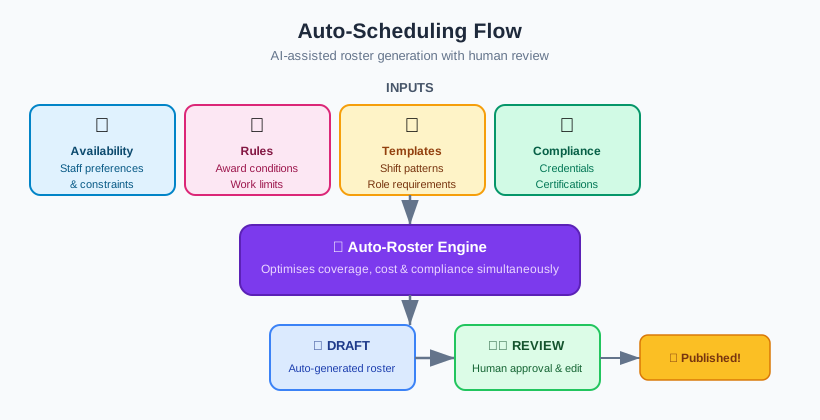
What “automatic scheduling” and “auto-rostering” actually mean
Automatic scheduling (or auto-rostering) is the use of software to build, fill and check rosters with far less manual input than a blank-grid approach. Instead of placing every shift by hand, you set up the structure once and let the system do the repetitive work.
In practice, automated shift scheduling in Australia usually covers a combination of:
- Roster templates — pre-built shift patterns for a site, crew or project that you apply in one click rather than rebuilding each cycle
- Recurring rosters — patterns that repeat automatically (for example a standard week, a 2-and-1 swing, or a fixed day/night rotation) so the baseline roster generates itself
- Auto-fill from live availability and qualifications — the system suggests or slots in workers who are available, hold the right tickets and are not already booked elsewhere
- Conflict and compliance detection — automatic flagging of double-bookings, fatigue breaches and expired licences before a roster is published
- Bulk actions — copying a week, shifting an entire crew’s start times, or reassigning a site’s shifts in a single step instead of one at a time
The thread running through all of these is that the software handles the predictable, repetitive parts of rostering so a human can focus on the decisions that actually need judgement.
The time automation saves versus manual rostering
The biggest cost of manual rostering is not any single task — it is the constant re-doing. Every change ripples, and every ripple has to be checked by hand.
Starting from a baseline instead of a blank grid
Most rosters are roughly the same week to week. With templates and recurring patterns, the baseline roster is already in place when the coordinator sits down — coverage met, regular crews assigned, standard shifts populated. The work shifts from building a roster to adjusting one, which is far faster. This is the practical payoff of keeping every site live in one rostering view: the structure persists, so you are never starting from zero.
Filling gaps without manual cross-checking
When a slot needs filling, the slow part is mentally cross-referencing availability, qualifications and existing bookings. Auto-fill from live data collapses that into a suggestion: here are the people who are available, qualified and free. The coordinator picks; the software has already done the checking.
Catching problems before they cost you
Manual rostering catches conflicts only when someone notices — often after the roster is published. Automated conflict detection surfaces double-bookings and compliance issues as you build, which is exactly where the day-of disruption that no-shows and rostering slips cause gets driven down. Fewer errors at build time means fewer fires to fight on the day.
Making bulk changes in one move
When a project slips a week or a site changes hours, manual rostering means editing dozens of shifts. Bulk actions — copy, shift, reassign — turn that into a single operation, which is where a lot of the day-to-day time saving actually lives.
Rules-based automation today versus AI scheduling tomorrow
This is the most important distinction in the whole category, and the one most often blurred in marketing.
What rules-based automation is
The automation available now — templates, recurring rosters, auto-fill from availability, conflict and compliance detection — is rules-based. It follows deterministic logic you can see and predict: this worker is available, holds a current ticket and is not double-booked, so they can be slotted into this shift. There is no guessing. The same inputs always produce the same result, which is exactly what you want for compliance-sensitive decisions.
What AI scheduling adds
AI scheduling is a separate, future direction. Rather than applying fixed rules, it uses optimisation and machine learning to generate a draft roster, balance the whole schedule at once, and predict problems like likely no-shows. It is genuinely powerful — but it is also a different class of technology, with its own risks around bias, transparency and data quality. We unpack those trade-offs in our companion guide to AI-driven scheduling in Australia.
The contrast in one line: rules-based automation does the repetitive work predictably; AI scheduling proposes and optimises. Today, the time savings above come entirely from rules-based automation — no AI required. AI is the next step, not the current one.
Keeping a human in control
Automation is there to remove busywork, not to make the final call. The most effective model — for both rules-based automation today and AI tomorrow — is that the software does the heavy lifting and an experienced coordinator approves the result.
This matters because the hardest scheduling decisions are the ones automation can’t see: crew dynamics, a client’s preference for a particular team, a one-off site requirement, or the knowledge that two workers shouldn’t be paired on a tricky job. A template can place the regulars and auto-fill can suggest the rest, but the coordinator’s judgement is what turns a technically valid roster into the right one. Features like filters, teams and reason codes in the scheduler exist precisely to keep that human oversight fast and informed rather than slowing it down.
Automation should also make compliance impossible to skip. The strongest setups treat fatigue and licence checks as hard gates at the point of scheduling, so a non-compliant shift can’t be confirmed in the first place — our guide to enforcing fatigue rules at the point of scheduling shows how those gates work in practice.
Why data quality decides how well automation works
Every form of automatic scheduling depends on one thing: the quality of the data underneath it.
Auto-fill can only suggest the right people if availability is current, qualifications are recorded accurately, and licence expiry dates are up to date. Conflict detection can only flag a double-booking if every booking lives in the same system. If the data is stale or scattered across spreadsheets, automation will confidently produce a roster that looks fine and isn’t.
Practical foundations for good data:
- Keep availability live — workers updating their own availability beats a coordinator guessing from memory
- Record qualifications and expiries properly — so qualification matching and compliance gates actually have something to check against
- Hold all bookings in one place — including subcontractors, so conflict detection sees the whole picture
- Close the loop with confirmation — pair automation with getting shifts confirmed over team messaging so a generated roster turns into a confirmed one
Get the data right and automation saves real time. Get it wrong and you have automated the production of bad rosters.
How Humanz builds rosters for you today
To be clear about what this is: roster automation in Humanz today is rules and template based, not AI. The whole job is taking the predictable assembly off a coordinator’s plate using live data and deterministic checks, while they keep the final say.
In practice that means the baseline roster is already there before anyone touches it. Apply a standard week, swing or rotation in a single step from a saved template, and every site, crew and shift stays current in one real-time, multi-site view. When a gap opens, auto-fill reads live availability and matches qualifications so you see who is free, ticketed and not already booked before you assign — and conflict detection flags double-bookings and clashes as you build rather than after publishing. Because direct employees and subbies sit in the same interface, those checks see the whole picture. Compliance is handled the same way: fatigue thresholds and licence-currency checks act as hard gates that stop a non-compliant shift being confirmed at all. When the plan changes, bulk actions copy, shift and reassign across a week or a site in one move, and workers pick up shifts, changes and reminders instantly through the Humanz mobile app — see how Humanz handles rostering from template to confirmed shift.
All of that runs on clean, live data and hard compliance rules — the same foundations that responsible AI scheduling will eventually depend on. As part of how we keep developing the platform, AI-assisted scheduling sits on the roadmap; today, the time savings come entirely from rules-based automation with a human firmly in control.
Frequently asked questions
Does Humanz use AI to schedule? Not yet. What Humanz runs today is deterministic: saved templates, recurring patterns, auto-fill from live availability and qualifications, plus conflict and compliance checks. AI-assisted scheduling is something we’re working towards, but the speed you get right now comes from predictable rules doing the repetitive work — not from machine learning.
What is the difference between auto-rostering and AI scheduling? Auto-rostering uses fixed rules and templates to do repetitive work predictably — the same inputs always produce the same result. AI scheduling uses optimisation and machine learning to generate and optimise drafts and predict problems. Rules-based automation is available today; AI scheduling is a separate, future direction covered in our AI rostering guide.
How much time does automatic scheduling actually save? The biggest saving comes from starting with a template-based baseline instead of a blank grid, then using auto-fill and bulk actions for changes. Coordinators move from building rosters by hand to reviewing and adjusting them, which removes most of the repetitive cross-checking that makes manual rostering slow.
Do roster templates work across multiple sites and crews? Yes. Templates and recurring patterns can be set up per site, crew or project and applied independently, so each part of the business keeps its own structure while the coordinator manages everything from a single live rostering board.
Does automated roster generation handle Australian compliance? It should treat compliance as hard rules, not suggestions. The strongest tools enforce WHS fatigue obligations and award conditions as gates at the point of scheduling, blocking non-compliant shifts rather than producing them. Safe Work Australia’s fatigue guidance covers the WHS side, while Fair Work sets the award and hours obligations any automated roster must respect.
Will automation replace coordinators? No. Automation removes the repetitive assembly and checking; coordinators still make the judgement calls — crew dynamics, client preferences and one-off site needs that software can’t see. The right model is that the system does the heavy lifting and a human approves the result.
What makes auto-rostering work well? Data quality. Auto-fill, qualification matching and conflict detection are only as good as the live availability, qualification and booking data behind them. Keeping availability current, recording expiries accurately and holding all bookings — including subcontractors — in one place is what makes automation reliable.
Tired of dragging shifts into a grid every cycle? Grab a Humanz walkthrough and bring last week’s roster — we’ll turn it into a reusable template and let auto-fill populate it live.
Related articles
Ready to see Humanz on your own roster?
Free 30-minute walkthrough — we'll use your real crews, sites and shift patterns.