
 Login
Login 

Rostering
Rostering Software Australia: How to Choose the Right Platform for Field Teams
By Humanz · 2026-06-22
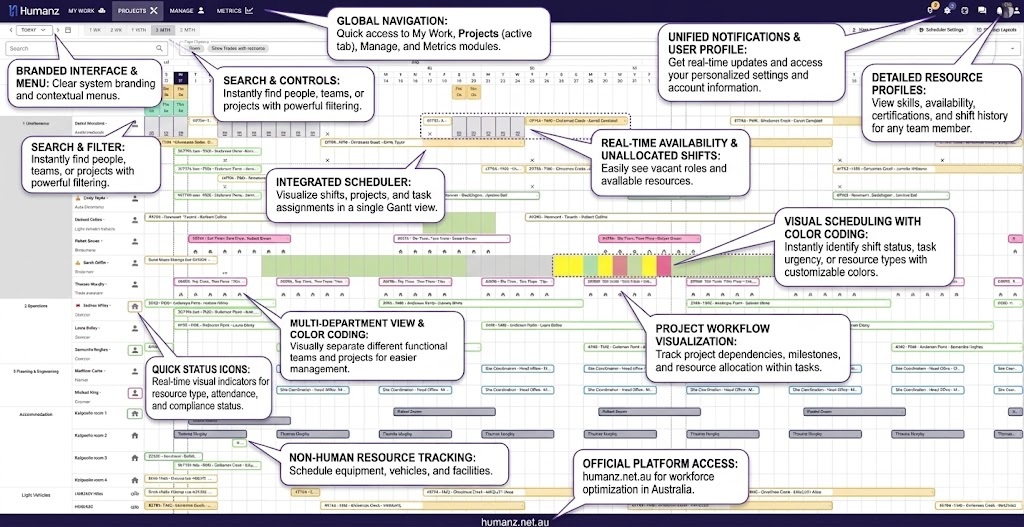
Rostering software in Australia ranges from simple drag-and-drop shift builders designed for hospitality to full workforce management platforms built for the complexity of multi-site construction and FIFO mining operations. For trades, construction, and mining services businesses, picking the wrong category of tool creates more problems than it solves.
This guide covers what workforce rostering software should do for Australian field businesses, what separates relevant platforms from generic scheduling tools, and how to think through the evaluation.
What workforce rostering software actually needs to do
Before comparing platforms, it helps to be clear about what the problem is. Rostering software for a café with ten casual staff and a fixed location is a solved problem — there are dozens of adequate tools. The requirements for a mechanical contracting business managing 80 workers across four remote sites, with a mix of direct employees and subcontractors, FIFO swing rosters, and strict WHS compliance obligations, are an entirely different challenge.
For Australian field businesses, workforce rostering software needs to handle:
- Multi-site visibility — all sites, all crews, and all shifts in a single view without switching between separate rosters
- Dynamic scheduling — last-minute changes, callout shifts, and crew swaps in real time with instant notification, with automatic scheduling and auto-rostering to build the baseline roster for you
- Mixed workforce types — direct employees and subcontractors rostered from the same platform, with different compliance profiles
- Compliance integration — fatigue monitoring, licence currency, and qualification checks embedded in the scheduling workflow before shifts are confirmed
- FIFO and extended roster patterns — swing rosters, rotating nights, and back-to-back patterns that don’t fit a standard weekly template
- Shift confirmation tracking — knowing whether workers have seen and accepted shifts before the day of work
- Mobile access — coordinators and workers both need to manage and respond to rosters from their phones
If a rostering platform doesn’t handle all of these, it’s not built for the field.
The compliance dimension of Australian rostering
Australian businesses operate under a compliance framework that generic rostering tools — particularly those built for international markets — often don’t account for.
Fair Work obligations
Modern awards set the minimum entitlements for employees in covered industries — including minimum rest periods between shifts, maximum ordinary hours, overtime entitlements, and penalty rates. The Fair Work Commission’s award finder is the definitive reference for which award applies to your workers and what it requires. A rostering system that doesn’t flag when a roster breaches these obligations is a liability.
For shift workers specifically, the entitlements can be complex. Fair Work Act compliance for shift workers covers the key obligations Australian employers need to build into their rostering decisions. The Fair Work Ombudsman’s pay and conditions calculator provides a practical tool for checking entitlement compliance for specific scenarios.
WHS fatigue obligations
Under model WHS laws adopted across Australian states and territories, employers must manage foreseeable risks — including fatigue from excessive or poorly-structured shift patterns. Safe Work Australia’s fatigue risk management guidance requires businesses to identify, assess, and control fatigue risks systematically.
Rostering software that includes fatigue monitoring — alerting coordinators when a roster pushes a worker into unsafe hour thresholds — turns this compliance obligation from a manual checking exercise into an automated safeguard. Fatigue management software built into the scheduling workflow is the modern standard. Healthdirect Australia provides the medical basis: 17 hours without sleep creates impairment equivalent to a 0.05 blood alcohol level — the reality behind the regulation.
For transport operations, the National Heavy Vehicle Regulator sets prescriptive work and rest hour requirements. Mining businesses in WA operate under DMIRS fatigue guidance that goes beyond general WHS obligations.
Licence and qualification requirements
Construction, mining, and trades businesses must verify that workers hold current and valid qualifications for the work they’re assigned to. The national training register at Training.gov.au is the reference point — a rostering system that tracks licence expiry and flags non-compliant workers at scheduling stage eliminates the reliance on human memory.
What separates good from average rostering software
Multi-site rostering with real-time visibility
The most significant operational differentiator for field businesses is simultaneous visibility across all sites. In a construction or mining services business, a coordinator may be managing workers across five or ten active sites on any given day. Switching between spreadsheet tabs or making phone calls to build a site picture creates bottlenecks and leaves gaps.
Real-time multi-site rostering means a coordinator sees all workers, all sites, and all shifts at once — and makes changes that are immediately reflected across the system and communicated to affected workers.
Shift confirmation and seen/unseen tracking
Publishing a roster to 40 workers is not the same as having 40 workers confirmed for their shifts. Shift confirmation tracking — knowing whether each worker has seen and acknowledged their shift — surfaces this information before the shift starts so gaps can be filled proactively. This distinction becomes very clear at 5am when a no-show wasn’t predicted.
Subcontractor scheduling in the same view
Most rostering tools are built for direct employees. Subcontractors are often managed separately — in a phone book, a spreadsheet, or a different system. For businesses where subcontractors represent a significant portion of the operational workforce, this fragmented view is operationally dangerous.
Workforce rostering software for trades and construction should manage subcontractors in exactly the same scheduling interface as direct employees. Managing subcontractors without the spreadsheet chaos covers why the integration between scheduling and subcontractor management matters so much.
Compliance gates embedded in scheduling
The difference between a rostering tool and a workforce management platform is often compliance integration. A pure rostering tool lets you build a schedule. A WFM rostering platform actively prevents you from building a non-compliant schedule — by flagging fatigue breaches, expired licences, and missing inductions before you confirm a shift.
For the full picture on how automated compliance and qualification expiry alerts work within the scheduling workflow, this is where purpose-built field platforms genuinely separate themselves from adapted general tools.
FIFO and non-standard roster support
Standard rostering software is built for weekly patterns. FIFO operations run on swing patterns — two weeks on, one week off, rotating between crews, with travel days added to either end. Managing FIFO flights and accommodation within the rostering workflow is a genuine operational requirement for remote businesses, not an optional feature. For the complete swing picture, see our FIFO rostering software guide.
The Australian Mines and Metals Association has published extensively on FIFO workforce management requirements — the complexity of managing extended rosters across remote sites is well-documented.
Reporting and workforce analytics
A roster is also a data asset. Scheduler power tools — filters, team views, and reason codes for unallocated shifts turn the roster into an operational reporting layer. Over time, this data shows patterns that enable better planning, reduced overtime costs, and smarter deployment decisions.
AIPM publishes resources on workforce planning in project environments — the scheduling data your WFM system accumulates is exactly the kind of workforce intelligence that supports better project planning decisions.
The operational cost of poor rostering
The direct costs of no-shows, last-minute crew scrambles, and compliance breaches from inadequate rostering software are significant. For a construction crew of 15 workers at an average day rate of $600, a single preventable no-show costs $600 in lost productivity before accounting for the cost of finding a replacement, the delay to other crew members, and any project schedule impact.
Multiply this across a business running multiple sites and the cost of inadequate rostering tools quickly exceeds the cost of a purpose-built platform. The broader context on what no-shows cost and how better rostering prevents them makes this concrete.
Chamber of Commerce and Industry WA and Business Chamber Queensland have both highlighted labour productivity as a key challenge for Australian field industry businesses — and roster management is a direct input into that outcome.
How Humanz approaches workforce rostering
Humanz is an Australian-built workforce management platform with rostering at its core. The scheduler is purpose-built rostering software for Australian field industries — not adapted from a hospitality scheduling tool.
Key rostering capabilities:
- Multi-site dashboard — all sites, workers, and shifts visible in a single real-time view
- Live availability — see who’s available, qualified, and compliant before making a booking
- Subcontractor scheduling — book subbies onto jobs from the same interface as direct employees
- Shift confirmation tracking — seen/unseen status for every worker on every shift, with direct reminder capability
- Fatigue monitoring integrated — alerts fire at the point of scheduling, before a non-compliant roster is confirmed
- Licence and qualification checks — workers with expired tickets are flagged before being rostered
- FIFO and swing roster support — extended and non-standard roster patterns handled natively
- Instant mobile notifications — workers receive shift details, changes, and alerts through the Humanz app
- Job-linked communication — send briefings and schedule updates linked to specific jobs and sites
- Workforce analytics — compliance dashboards, shift fill rates, and unallocated work tracking
Humanz is used by construction companies, mechanical contracting businesses, mining services operators, drilling companies, and trades businesses across Australia.
See how Humanz works for your team →
Frequently asked questions
Can workforce rostering software handle both permanent and casual employees? Yes. Good rostering software handles all employment types — permanent full-time, part-time, casual, labour hire — with different availability patterns and entitlements managed appropriately. Humanz handles all of these, plus subcontractors, in a single platform.
How does rostering software handle last-minute changes? Real-time rostering software allows coordinators to make changes from desktop or mobile with instant notifications pushed to affected workers. Live availability data means a replacement for a no-show can be identified and contacted within minutes, not through a chain of phone calls.
Can workers view their rosters on their phones? In Humanz, workers have full roster visibility through the mobile app — including upcoming shifts, recent changes, and shift-specific details like site address and job brief. Shift confirmation is also submitted through the app.
How does rostering software help with overtime management? By tracking cumulative hours across the pay period and flagging when a worker’s additional shift would push them into overtime, rostering software enables cost-conscious scheduling decisions and avoids unintended overpayments. This is particularly important for businesses under Award conditions that apply overtime rates after certain daily or weekly hours — see Fair Work compliance for shift workers for the detail.
Is it possible to use templates for repeating roster patterns? Yes. Humanz allows roster templates to be built for repeating patterns — weekly rotations, FIFO swings, or standard crew configurations — and applied to new periods without rebuilding from scratch.
What’s the difference between a roster and a timesheet in the system? The roster is the planned schedule — what shifts workers are assigned to. The timesheet records actual time worked. In Humanz, timesheets are generated automatically from roster data and adjusted based on actual attendance, reducing the gap between what was planned and what gets paid. Digital timesheets for tradies covers this workflow in more detail.
How does the platform handle workers in different states with different award requirements? Humanz supports state-based compliance configurations, allowing businesses operating across multiple states to manage different award conditions within a single platform. Get in touch to discuss your specific multi-state setup.
Managing roster complexity across multiple sites or crew types? Book a demo and we’ll set up a walk-through with your industry context and team structure in mind.
Related articles
Ready to see Humanz on your own roster?
Free 30-minute walkthrough — we'll use your real crews, sites and shift patterns.