
 Login
Login 

Payroll & Leave
Leave Management Software: Key Considerations for Field and Shift-Based Teams
By Humanz · 2026-07-01

Leave looks simple on paper. A worker asks for time off, a manager says yes or no, and the days come out of a balance somewhere. In practice, for businesses running rotating shifts, multiple sites and FIFO crews, leave is one of the messiest parts of workforce management. A single approved week of annual leave can leave a gap on a roster, trigger a scramble for coverage, and — if the records are wrong — turn into a Fair Work problem months later.
This article walks through what makes leave harder for shift and field-based teams, the leave types you need to handle under Australian law, and what to look for in leave management software — plus a straight account of how Humanz fits leave into rostering rather than treating it as a separate silo.
Why leave is harder for shift and field-based teams
For a standard Monday-to-Friday office, leave is mostly an HR formality. For construction, mechanical contracting, mining services and drilling crews, every absence has an operational cost.
Coverage is the real problem, not the form
When a worker on a roster takes leave, someone has to fill that slot. If your leave process lives in email and your roster lives somewhere else, the person approving leave can’t see what they’re approving against. The result is double-booking, last-minute backfilling, and shifts that quietly go uncovered.
Field workers aren’t at a desk
Office-based leave systems assume people log in to a portal. Field and shift workers don’t. They’re on site, in a vehicle, or on a remote project with patchy reception. A leave process that depends on sitting at a computer simply doesn’t get used, which is why so much field leave still moves by text message and verbal nod — neither of which leaves a record.
Multiple sites multiply the chaos
Run several projects and you have several supervisors approving leave with no shared view of who’s already away. One site can approve three people off in the same week without realising another crew is already short. The more distributed the workforce, the more a central, visible leave process matters — a theme we cover in our guide to a workforce management app for Australia.
The leave types you need to handle
Australian employers have minimum leave entitlements set out in the National Employment Standards (the NES). Any leave management system you consider has to accommodate these at a high level. The detail of accrual and entitlement calculation should always be driven by your payroll system and the relevant award or agreement — software that promises to “just calculate it” without that alignment is overpromising.
Common NES leave types
- Annual leave — generally four weeks per year for full-time employees, accrued progressively, with extra for some shift workers.
- Personal/carer’s leave — paid leave for illness or caring responsibilities for full-time and part-time employees.
- Compassionate leave — for when a family or household member dies or suffers a life-threatening illness or injury.
- Unpaid family and domestic violence leave and parental leave — entitlements with their own rules around eligibility and notice.
- Long service leave — governed by state and territory legislation rather than the NES.
For the authoritative detail on each type, the Fair Work Ombudsman maintains a plain-English breakdown of every leave entitlement, and the full set of minimum standards is laid out in the minimum entitlements all employers must meet. Treat these as your source of truth and configure your software to support them — not the other way around.
The link between leave and rostering
This is the consideration most leave software ignores, and it’s the one that matters most for shift-based teams. Leave and rostering are the same problem viewed from two angles. Approve leave without seeing the roster and you create gaps. Build a roster without seeing approved leave and you schedule people who aren’t there.
Visibility prevents double-booking
When approved leave appears directly on the roster, the person building shifts can see at a glance who is unavailable. That single piece of visibility removes the most common cause of no-shows: rostering someone who has already been granted time off. It’s closely tied to the broader work of reducing no-shows with real-time rostering.
Coverage planning becomes proactive
Seeing leave against the roster ahead of time lets you plan coverage instead of reacting to it. You can shuffle crews, bring in subcontractors, or adjust shift patterns while there’s still time to do it calmly. Leave that surfaces only when a worker doesn’t turn up is the worst case — and the most expensive.
Mobile requests and approvals
For field teams, the request and approval flow has to work on a phone. If it doesn’t, it won’t be used.
What good mobile leave looks like
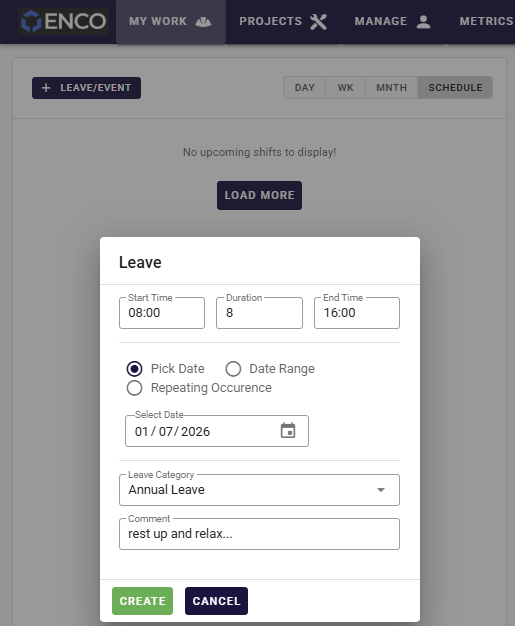
- Workers submit a leave request from a mobile app, on site, in seconds.
- The request routes to the right manager for approval — no chasing, no paper form.
- The worker gets a clear yes or no, with a record of when and by whom.
- Approved leave flows back into the roster automatically, rather than living in someone’s inbox.
The advantage of handling leave inside the same app workers already use for shift confirmation and timesheets is adoption. People who already check the app for their roster and submit digital timesheets will use it for leave too, instead of defaulting to a text message that leaves no trail.
Record-keeping and compliance
Leave records aren’t optional. Australian employers are required to keep accurate records of leave balances and leave taken, and to be able to produce them. Poor record-keeping is one of the quieter ways businesses end up exposed in a Fair Work review.
What your system should capture
- A clear, time-stamped record of every request, approval and rejection.
- Who approved each request and when.
- Leave taken, tied back to the worker and the relevant period.
- An audit trail you can actually retrieve, rather than reconstruct.
Good leave records sit alongside the rest of your compliance obligations for shift workers. We cover the wider picture in our guide to Fair Work compliance for shift workers. The key principle for leave: balances and entitlement calculations should align with your payroll system, which remains the system of record for accruals.
FIFO and roster-cycle interactions
Fly-in fly-out and compressed roster cycles add a layer most generic leave tools never anticipate.
Leave against a swing, not a calendar week
A worker on a two-and-one roster doesn’t experience leave as “a week off” — their days on and off are already structured by the swing. Approving leave has to account for where the request lands in the cycle and how flights and accommodation are affected. A day of approved leave can ripple into travel and camp bookings, which is why leave can’t be considered in isolation from the logistics. Our piece on FIFO flights and accommodation in rostering covers how tightly these connect.
A standalone leave app that doesn’t understand roster cycles will happily approve time off that breaks a swing or strands a crew. For FIFO and roster-heavy operations, leave management only works when it shares a view with the roster.
What to look for in a leave management system
Pulling it together, here’s a practical checklist when comparing leave management software in Australia for a field or shift-based workforce.
- Roster integration — does approved leave appear on the roster automatically, so you avoid double-booking?
- Mobile-first — can field workers request leave and managers approve it from a phone, anywhere?
- Clear approval workflow — is there a defined route from request to decision, with notifications?
- Audit trail — does it keep a retrievable, time-stamped record of every leave decision?
- Multi-site visibility — can you see leave across crews and projects in one place?
- Roster-cycle awareness — does it understand swings and shift patterns, not just calendar weeks?
- Payroll alignment — does it work with your payroll system as the source of truth for accruals rather than reinventing it?
It’s worth being clear-eyed about the category of tool you need. For shift-based teams, leave is a workforce-operations problem first and an HR problem second — a distinction we explore in our comparison of workforce management versus HR software. And because accruals ultimately belong to payroll, how leave data flows into pay matters too; see our notes on payroll integration in workforce management.
How Humanz fits leave into rostering
Humanz is an Australian-built workforce management platform built for the realities of crews working across construction, mechanical contracting, mining services, drilling and trades. The deciding choice we made with leave is to keep it inside rostering rather than off in a separate admin tool — so a request a worker taps out on site flows straight into the same view the supervisor uses to build shifts.
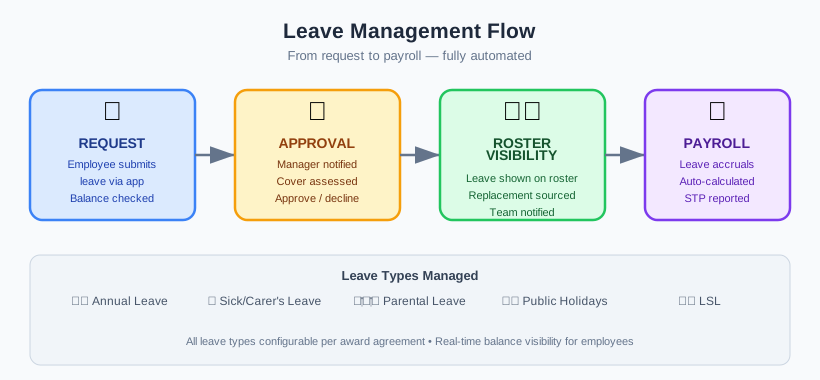
That plays out as a single loop. A worker raises a leave request from the mobile app — on site, in a vehicle, wherever they are — without a paper form or a text that disappears into someone’s phone. The request lands with the right manager, who approves or declines it and leaves a dated record of who decided what. From there the approved leave shows up directly in rostering, so whoever is building the week can see the gap before they schedule into it rather than after a worker fails to turn up. Because leave shares a home with shift confirmation, digital timesheets, fatigue tracking and credential expiry alerts, it reads as one operational picture instead of a bolt-on that nobody opens.
To be straight about it: what Humanz manages is the request, the approval and the roster visibility — the operational half of leave that generic leave tools tend to ignore. Accrual and entitlement calculations should still align with your payroll system, which stays the source of truth for balances under the relevant award or agreement. We deliberately don’t promise to calculate entitlements for you; we make sure approved leave turns up where the roster gets built. You can see how that same visibility rolls up into broader reporting in our overview of workforce analytics for field operations.
Tired of approving leave blind and finding the gap on the roster a fortnight later? Grab a Humanz walkthrough — bring a real swing or roster cycle and we’ll show you leave and coverage lining up on the same screen.
Frequently asked questions
What is leave management software?
Leave management software is a system for requesting, approving and recording employee leave. For shift and field-based teams, the most useful versions connect leave directly to rostering so that approved time off is visible when shifts are built, reducing double-booking and uncovered gaps.
Why is managing leave harder for shift workers?
Because every absence has an operational cost. When a shift worker takes leave, their roster slot has to be covered. If leave approvals and the roster live in separate systems, managers approve time off without seeing the impact, which leads to gaps and no-shows.
What leave types do Australian employers have to provide?
The National Employment Standards set minimums including annual leave, personal/carer’s leave, compassionate leave, parental leave and unpaid family and domestic violence leave. Long service leave is set by state and territory law. The Ombudsman publishes the authoritative detail for each leave type.
Does Humanz calculate leave accruals?
Humanz handles leave through requests, approvals and roster visibility. Accrual and entitlement calculations should align with your payroll system, which remains the source of truth for balances. The value Humanz adds is making approved leave visible directly in rostering.
Can workers request leave from their phone?
Yes. With Humanz, workers submit leave requests through the mobile app from anywhere, managers approve or decline them, and approved leave becomes visible in rostering — without paper forms or chasing requests by text.
How does leave connect to rostering?
Leave and rostering are two views of the same problem. When approved leave appears on the roster, the person building shifts can immediately see who’s unavailable, plan coverage in advance and avoid scheduling someone who already has time off.
What should I look for in a leave management system for field teams?
Prioritise roster integration, a mobile-first request and approval flow, a retrievable audit trail, multi-site visibility, roster-cycle awareness for FIFO and shift patterns, and alignment with your payroll system as the source of truth for accruals.
Related articles
Ready to see Humanz on your own roster?
Free 30-minute walkthrough — we'll use your real crews, sites and shift patterns.