 Login
Login 

Industries
Workforce Management vs HR Software: What's the Difference and Where Humanz Fits
By Humanz · 2026-06-24

Ask any growing field business what software runs their people, and you’ll usually hear two categories thrown around interchangeably: HR software and workforce management software. They sound like they should be the same thing — both are about your people, after all — but they solve genuinely different problems. Confusing the two leads to buying the wrong tool, paying for overlapping features, or expecting a platform to do something it was never designed to do.
This guide breaks down workforce management vs HR software in plain terms: what each does best, where they overlap, why most field businesses end up running both, and exactly where a platform like Humanz fits in your stack. We’ll also be honest about what Humanz deliberately leaves to dedicated HR and payroll systems — because knowing the boundary is what makes the combination work.
What is HR software (HRIS)?
HR software — often called an HRIS (Human Resource Information System) — is the system of record for the employment relationship. It manages people as employees: who they are, how they’re paid, and how their employment progresses over time.
A typical HRIS handles:
- Employee records — personal details, employment contracts, tax and super details, emergency contacts
- Payroll processing — gross-to-net calculations, PAYG withholding, superannuation, payslips, Single Touch Payroll reporting to the ATO
- Performance and development — reviews, goals, training records, career progression
- Leave entitlements and accruals — calculating and tracking annual leave, personal/carer’s leave, long service leave balances
- Benefits and remuneration — salary bands, bonuses, salary packaging
- Employee self-service — payslips, leave requests, personal detail updates
The defining characteristic of an HRIS is that it’s built around the employee lifecycle — hire to retire. It answers questions like “what is this person paid?”, “how much leave have they accrued?”, and “what’s their employment history?”
What is workforce management software?
Workforce management software (WFM) is built around the work rather than the employment relationship. It answers a different set of questions: “who is working where, today?”, “are they qualified for the job they’re rostered on?”, “did they actually confirm the shift?”, and “how many hours did they work this week?”
For a deeper definition, our breakdown of what workforce management software actually covers walks through the full scope, but the core functions are operational:
- Rostering and scheduling — building shifts across multiple sites in real time, handling changes, shift swaps and confirmations
- Time and attendance — digital timesheets generated from roster data, replacing paper and manual re-entry
- Compliance gates — fatigue monitoring and licence/induction checks at the point of scheduling
- Subcontractor management — coordinating both employees and subbies from one platform
- Field communication — job-linked messaging instead of WhatsApp groups and SMS chains
- Workforce analytics — hours, fill rates, no-shows, and compliance status across the workforce
Where an HRIS thinks in terms of employees and pay cycles, a WFM platform thinks in terms of sites, shifts, crews and credentials. For Australian field businesses, this is the layer where the operational day actually happens — the rostering app Australian field teams run on day to day is what a coordinator and a worker both live in.
Workforce management vs HR software: the core difference
The simplest way to hold the distinction in your head:
- HR software manages the employee. Contracts, pay, entitlements, the full employment lifecycle.
- Workforce management software manages the work. Who’s rostered, where, qualified for what, for how many hours.
So if you’re asking “HR software vs rostering — which do I need?”, the honest answer for most field businesses is: probably both, eventually. But they enter the picture at different points. A business with five staff on stable pay might run payroll through an accountant and manage shifts in a spreadsheet. The moment that business is juggling multiple sites, subcontractors, expiring tickets and fatigue rules, the WFM layer becomes the urgent gap — long before they outgrow their payroll setup.
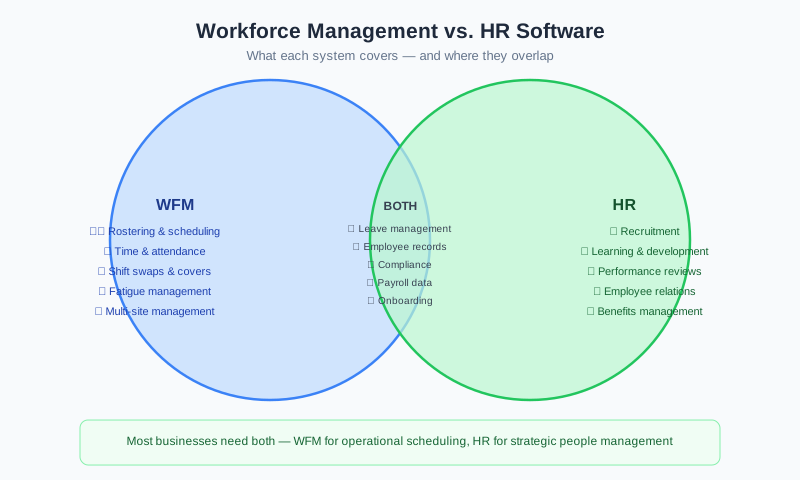
Where HR and workforce management overlap
The reason these two categories get confused is that they genuinely share a border. Several functions can live in either system, and where they sit depends on your stack. The overlap zones are:
Onboarding
Both worlds claim onboarding, but they mean different things. HR onboarding is about employment paperwork — contracts, tax declarations, super choice. Operational onboarding is about getting a worker site-ready — inductions, qualifications verified, documents collected, mobile app set up. For field teams, that operational side is what determines whether someone can actually start work. Our guide to getting field workers site-ready faster and the deep-dive on mobilising crews across mining and construction sites show how this plays out on real sites.
Documents
An HRIS stores employment documents; a WFM platform stores operational ones — site inductions, SWMS sign-offs, certificates, licences. In practice, field businesses need the operational documents accessible to coordinators and workers in the field, not buried in an HR archive. Keeping the right paperwork visible at the point of work is what stops a crew being stood down over a missing SWMS.
Leave
This is a classic overlap. The HRIS owns leave entitlements and accruals — the financial and legal balance. The WFM platform needs leave visibility so a coordinator doesn’t roster someone who’s on approved annual leave. The two are complementary: one calculates, the other schedules around it. We unpack how to decide which system should own each part of leave separately.
Credentials and qualifications
An HRIS may record that a worker holds a qualification. A WFM platform actively enforces it — blocking or flagging a roster when a licence, ticket or induction has expired. That enforcement at the point of scheduling is the difference between a record and a control — see how tracking tickets, inductions and expiries actively changes the picture.
Time data
Time and attendance is captured in the WFM platform but consumed by payroll in the HRIS. Clean, verified time data is the bridge between the two — and we cover getting that timesheet-to-payroll handoff right in detail.
What each does best
It helps to be explicit about the strengths, because that’s what tells you not to make one system do the other’s job.
HR software does best:
- Calculating pay, tax, super and entitlements accurately
- Maintaining the legal employment record
- Managing performance, development and remuneration
- Reporting Single Touch Payroll to the ATO
Workforce management software does best:
- Real-time, multi-site rostering and shift confirmation
- Enforcing compliance — fatigue limits, licence and induction expiry — at the moment of scheduling
- Capturing accurate time data from the field
- Coordinating subcontractors alongside employees
- Giving coordinators live operational visibility
Trying to run rosters out of an HRIS, or trying to run payroll out of a rostering tool, is where businesses get burnt. Each is excellent at its core and weak outside it.
How they work together rather than compete
The most productive way to think about this isn’t “which one wins” — it’s how the two hand off to each other cleanly.
A healthy stack looks like this: the WFM platform runs the operational day — rosters, confirmations, compliance checks, timesheets. At the end of the pay cycle, verified time data flows from the WFM platform into payroll, where the HRIS does what it does best: calculate pay, withhold tax, pay super, and report STP. Leave entitlements live in the HRIS; leave visibility surfaces in the roster so scheduling stays accurate.
Done well, you get a single source of truth for each function and no double-entry. The WFM platform stops bad data entering payroll, and the HRIS stops you having to calculate entitlements by hand. They’re not competitors — they’re two halves of a complete people operation.
Record-keeping obligations apply either way
Whichever combination you run, the legal obligation to keep accurate records doesn’t go away. Under Australian law, employers must keep time and wages records for seven years, and they must be legible and accessible. The Fair Work Ombudsman’s record-keeping guidance sets out exactly what’s required, while the ATO governs payroll reporting and tax records.
This is one reason the time-data handoff matters so much. Paper timesheets and spreadsheet rosters make record-keeping fragile — records get lost, retrospectively edited, or simply never reconciled. A WFM platform produces timestamped, auditable records as a by-product of normal operations, which is exactly what stands up to scrutiny. The broader obligations for rostered and shift-based workforces are covered in our guide to staying compliant with shift-worker rules.
How Humanz fits alongside your HR stack
Here’s the honest part. Humanz sits firmly on the workforce management side of the line — it’s not an HRIS, and it’s not a payroll engine. We’re deliberate about that boundary, because pretending to be everything is how software ends up doing nothing well.
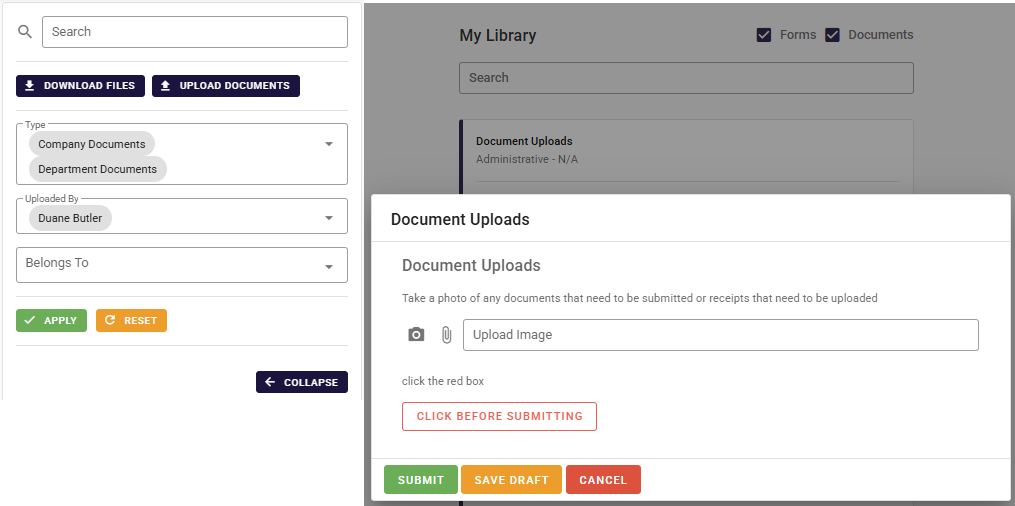
On the HR-adjacent overlap zones — the onboarding, documents, leave and credentials that started the confusion in the first place — Humanz handles the operational half. It mobilises workers and gets them site-ready, inducted and set up on the mobile app; it keeps licences, certificates, inductions and forms visible to coordinators and crews in the field rather than locked in an HR archive; it surfaces approved leave inside the roster so nobody gets scheduled while they’re away; and it actively enforces licence, ticket and induction expiry at the moment you build a shift instead of merely filing the record. The verified timesheets it produces are then ready to hand straight to payroll.
What stays with your dedicated HR and payroll systems is the employment-relationship side: gross-to-net pay, PAYG and superannuation, Single Touch Payroll reporting, leave entitlement and accrual maths, and performance management across the full hire-to-retire record. Humanz doesn’t compete with any of that — it feeds it cleaner data.
One question worth answering plainly while we’re being honest about scope: Humanz doesn’t use AI today. It’s on the roadmap, but every capability above is rule-based and human-driven, and we’d rather say so than dress up the product.
The result is a clean split. Humanz runs your operational workforce day and pipes verified data into the HR and payroll tools you already trust — so you stop asking your HRIS to roster, and stop asking a spreadsheet to keep your wage records.
Want to see exactly where Humanz would sit in your setup? Walk through it with our team and we’ll map it against the HR and payroll tools you already run.
Frequently asked questions
Do I need HR software or workforce management software? Most field businesses eventually need both, but for different reasons. If your urgent problem is rostering across sites, tracking expiring tickets, or chasing paper timesheets, that’s a workforce management gap. If your problem is calculating pay, super and entitlements, that’s an HR/payroll gap. They solve different things, so the right question is usually “which do I need first?” rather than “which one instead of the other?”.
Is workforce management software the same as HR software? No. HR software (an HRIS) manages the employment relationship — pay, entitlements, performance, the employee lifecycle. Workforce management software manages the work — rostering, time, compliance and field coordination. They overlap on onboarding, documents, leave and credentials, but their core purposes are different.
Can workforce management software replace my HRIS or payroll? Generally no, and Humanz doesn’t try to. A WFM platform produces the verified time data that payroll consumes, but pay calculations, tax, super, STP reporting and entitlement accruals belong in a dedicated HR/payroll system. Humanz complements those systems rather than replacing them.
Where does leave management sit — HR or workforce management? Both, in different ways. The HRIS owns the leave balance and accrual calculations. The WFM platform needs leave visibility so coordinators don’t roster someone who’s away. Humanz handles leave within rostering so your schedule stays accurate, while the entitlement maths stays in your HR system.
Does Humanz handle onboarding, and how is that different from HR onboarding? Yes — Humanz handles operational onboarding: inductions, qualification verification, document collection and getting workers app-ready. That’s distinct from HR onboarding (contracts, tax, super setup), which stays in your HRIS. For field teams, the operational side is what actually decides whether someone can start on site.
How do workforce management and payroll data work together? Time and attendance is captured in the WFM platform, then handed off to payroll as a clean, verified feed. This avoids double-entry and reduces payroll errors. It also supports your record-keeping obligations, since the time records are timestamped and auditable.
Does Humanz use AI? Not yet. AI capability is on the Humanz roadmap, but the current platform is rule-based. We’d rather be upfront about that than claim functionality the product doesn’t have today.
Not sure whether your next gap is HR or workforce management? Grab a Humanz demo and tell us which HRIS and payroll system you already run — we’ll show you live exactly where the rostering, compliance and timesheet layer slots in alongside them.
Related articles
Ready to see Humanz on your own roster?
Free 30-minute walkthrough — we'll use your real crews, sites and shift patterns.