
 Login
Login 

Industries
Workforce Management for Startups, Small Businesses and Service Teams
By Humanz · 2026-06-24

Most service businesses don’t start with software. They start with a spreadsheet, a group chat, and an owner who keeps the whole roster in their head. That works for a handful of staff — until it doesn’t. Somewhere between five and fifty people, the spreadsheet stops being a tool and becomes a liability, and the group chat turns into a stream of missed messages, no-shows, and timesheet arguments.
This guide is for startups, small businesses and service teams — cleaning, security, trades services, maintenance and the like — weighing up whether it’s time to adopt proper workforce management. We’ll cover when to make the move, how a lean team can do more with the right system, and what to look for in rostering software for startups and growing service businesses.

When spreadsheets and group chats start costing you
In the early days, manual tools feel free. They’re not — they just hide their cost. As a small business grows, the cracks show up in predictable places:
- No-shows and confusion — you published the roster in a chat thread, but you’ve no idea who actually read it or who’s turning up
- Timesheet disputes — hours are remembered, not recorded, and payday becomes a negotiation
- Owner bottleneck — every schedule change, sick-day swap and new-starter detail runs through one person’s phone
- Version chaos — three copies of the same spreadsheet, none of them current
- No paper trail — when a client queries an invoice or a worker queries their pay, there’s nothing solid to point to
If any of these sound familiar, you’ve likely outgrown manual scheduling. If you’re still getting your head around the category, our explainer on the difference between a roster tool and a full platform is a good place to start.
The tipping point
There’s no magic headcount, but a few signals tend to mean it’s time:
- You’re managing more than one site, shift pattern or client at once
- You employ casuals or engage subcontractors whose availability changes week to week
- You spend more than an hour or two a week just building and re-sending the roster
- A payroll or compliance mistake has already cost you money or goodwill
Doing more with a lean team
The appeal of small business scheduling software in Australia isn’t fancy features — it’s leverage. The whole point is letting a small team punch above its weight by taking repetitive admin off the owner’s plate.
A capable platform lets you:
- Build a roster once and reuse it — templates turn a weekly chore into a few clicks
- Push changes instantly — update a shift and the affected staff are notified automatically
- See availability in one place — no more cross-referencing texts to find cover
- Confirm attendance before the shift — so you know who’s coming, not just who you asked
Real-time tools make the biggest difference here. Our piece on stopping no-shows before the shift starts shows how shift confirmation alone removes a major source of daily firefighting for a small operations team.
Scaling from a handful of staff to many
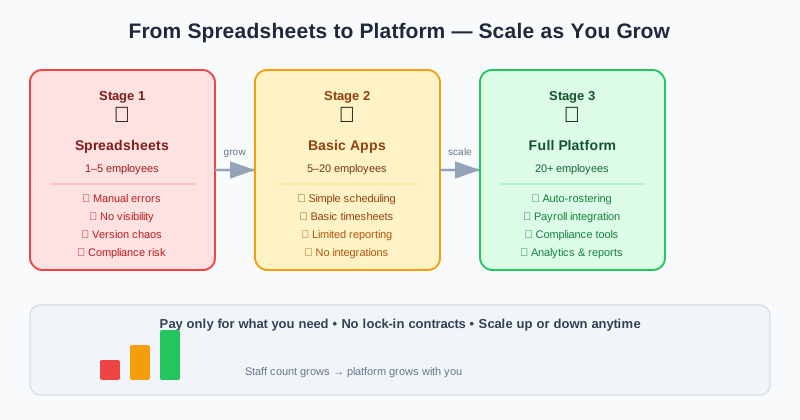
The right system should grow with you, not need replacing the moment you hit a new size. Staff scheduling for a small business of eight looks different from coordinating eighty across multiple sites — but the underlying platform shouldn’t.
What “scalable” looks like in practice:
- Multi-site visibility — as you take on more clients and locations, you need a single view of who’s working where. A platform built for mobile, multi-site teams is designed around that reality from the start, rather than a desk-based tool you bend into shape
- Repeatable onboarding — when you’re hiring steadily, digital onboarding and document collection get a new cleaner, guard or tradesperson job-ready without the owner chasing paperwork
- Process that holds under volume — the habits you build at ten staff (confirming shifts, logging hours digitally, tracking licences) are the ones that let you reach a hundred without chaos
Adopting a system early means scaling is just “more of the same,” not a painful re-platforming.
Managing casuals and subcontractors
Service businesses rarely run on a tidy roster of full-time employees. Casuals flex with demand, and subcontractors fill gaps you can’t staff directly. Both add scheduling and compliance complexity that spreadsheets handle badly.
For casuals, the priorities are availability and confirmation — knowing who can work when, and locking in cover quickly. For subcontractors, you also need to track that the right people, with the right qualifications and insurances, are on the job. Our guide to bringing subbies into one scheduling and compliance workflow covers how to manage them alongside employees, rather than running them on a separate phone-and-email process.
The Fair Work Ombudsman is also worth a read on the difference between employees and contractors — getting that classification wrong is one of the more expensive mistakes a growing business can make.
Getting paid right: timesheets to payroll
For most service businesses, hours worked are the business. If you can’t capture them accurately, you either under-bill clients, overpay staff, or spend your evenings reconciling the difference.
Moving from paper or memory to timesheets staff log on their phones does three things at once:
- Captures hours at the source — staff log time on their phone, on site, as it happens
- Removes transcription errors — no re-keying from a smudged sheet into a spreadsheet
- Creates a clean record — for invoicing, for pay, and for any dispute down the track
Timesheet accuracy is where small businesses leak the most money, often without noticing. Our breakdown of where the hours quietly go missing covers the common culprits — rounding, missed breaks, late submissions — and how a digital workflow closes them off.
Clean timesheet data is also the foundation for feeding approved hours straight through to pay, without manual re-entry. The ATO sets out your record-keeping and Single Touch Payroll obligations, and accurate digital time records make meeting them far less stressful.
Compliance from day one
It’s tempting to treat compliance as something to sort out “once we’re bigger.” In practice, retrofitting it across a larger workforce is far harder than baking it in from the start, so the businesses that build good habits early are the ones that scale smoothly.
The basics every service business should have in place:
- Time and wages records kept accurately and retained as required
- Licence and qualification tracking so no one works a job they’re not certified for
- Expiry alerts that warn you before a ticket, white card or insurance lapses
- A clear audit trail of who worked, when, and what was agreed
The Australian Government’s business.gov.au is a solid free reference for your obligations as an employer, from registrations to record-keeping. A workforce platform with compliance gates and expiry alerts turns those obligations from a periodic panic into a background process.
Mobile-first for teams in the field
Service teams don’t sit at desks. Cleaners, security staff, maintenance crews and trades work on the move, often across several sites in a day. That makes the mobile experience the single most important feature for a service business — not an add-on. A genuinely mobile-first platform lets staff:
- View and accept shifts from their phone
- Submit timesheets on site, without finding a computer
- Receive schedule changes and notifications instantly
- Complete forms and check-ins where the work happens
For more on what to look for, our guide to choosing the right app for a field team compares purpose-built field tools against generic scheduling apps that were never designed for staff who are rarely at a desk.
Cost and ROI: what to weigh up
For a startup or small business, every subscription has to earn its place. The right way to judge workforce management software isn’t the monthly price — it’s what it saves and unlocks:
- Owner’s time — hours a week handed back from manual rostering and chasing timesheets
- Reduced no-shows — confirmed shifts mean fewer last-minute scrambles and lost revenue
- Accurate billing and pay — fewer hours lost to under-billing and timesheet disputes
- Avoided compliance costs — catching an expired licence before it becomes a fine or a stand-down
A practical rule of thumb: if a platform saves the owner a few hours a week and prevents even one billing or payroll error a month, it has usually paid for itself. The goal isn’t the cheapest tool — it’s the one that lets a lean team run a bigger operation without adding admin staff.
How Humanz helps small and growing teams
Humanz is an Australian-built workforce management platform that already runs the rosters and compliance for demanding field operators across construction, mechanical contracting, mining services, drilling and trades. The reason it suits a smaller, growing service business is that the hard parts — multi-site scheduling, on-site timesheets, licence tracking — are battle-tested at scale, so you adopt them at ten staff and they hold all the way up — see the full Humanz platform for everything it covers.
In practice, that means the owner stops being the bottleneck. You build a roster across your sites once and confirm who’s actually turning up before the shift; your cleaners, guards or maintenance crews log their hours from their phones on the job, giving you a clean line straight to payroll; and your subbies sit in the same view as your direct staff rather than in a separate inbox. Licence and insurance expiries chase you instead of the other way around, new starters onboard through a document portal without you posting forms about, and the group chat that used to swallow your scheduling becomes proper in-app messaging with a record you can point to later.
One thing to be straight about, because it matters when you’re choosing where to spend a tight software budget: Humanz does not build rosters with AI today — that’s on the roadmap, not in the product. What you get instead is a practical system, run by an Australian team you can actually reach, designed around how field and shift crews really work. There’s more on that thinking on our approach page.
If you’ve outgrown spreadsheets and group chats, the next step is simple: book a walkthrough and we’ll look at the platform with your team size and trade in mind.
Frequently asked questions
When should a small business move off spreadsheets to workforce management software? A good signal is when scheduling, timesheets or compliance start taking real time each week, or when a no-show or payroll error has already cost you. For most service businesses that’s somewhere between five and twenty staff, or as soon as you’re juggling more than one site, shift pattern or client at once.
Is workforce management software worth it for a startup or very small team? Often, yes — because the biggest cost it removes is the owner’s time. Even at a handful of staff, the hours saved on rostering and timesheet admin, plus fewer no-shows and billing errors, usually outweigh a modest subscription. The key is choosing a tool you won’t outgrow.
What’s the difference between rostering software and full workforce management? Rostering software schedules shifts. A workforce management platform also handles shift confirmation, digital timesheets, subcontractor management, compliance and communication in one place. For a growing service business, the broader platform avoids stitching together several disconnected tools as you scale.
Can one system handle both casual staff and subcontractors? Yes. A capable platform schedules casuals and books subcontractors from the same interface, and tracks the qualifications and licences each job requires. That removes the separate phone-and-email process most small businesses run for subbies.
Will the software grow with us as we add staff and sites? It should. Look for multi-site visibility, repeatable digital onboarding and a mobile-first design from the start. Adopting a system early means scaling is simply more of the same workflow, rather than a disruptive switch later on.
Does Humanz use AI to build rosters? Not currently. AI-assisted scheduling is on the Humanz roadmap, but today the platform provides real-time manual rostering, confirmation, timesheets and compliance tools built for Australian field and shift teams.
How much does workforce management software cost for a small business? Pricing depends on your team size and the features you need. The practical way to judge it is by return — time saved, no-shows reduced and billing and payroll errors avoided. Talk to the Humanz team to discuss pricing for your workforce.
Outgrowing your spreadsheet is a good problem to have — it means you’re growing, and the teams that scale smoothly are the ones that put the right system in early. Book a Humanz demo and bring this week’s messiest roster — we’ll rebuild it live so you can see how it’d run.
Related articles
Ready to see Humanz on your own roster?
Free 30-minute walkthrough — we'll use your real crews, sites and shift patterns.