
 Login
Login 

Rostering
Deputy, Tanda, SprintSuite and RapidCrews Alternative: Workforce Software for Australian Field Teams
By Humanz · 2026-06-30

If you run a field-based workforce in Australia — construction crews, mechanical contractors, mining services, drilling teams or trades — there is a good chance you started out on a general rostering tool and have since wondered whether it still fits. Deputy, Tanda, SprintSuite and RapidCrews are all established, capable platforms used widely across the country, and many businesses run them happily for years.
The question most operators eventually ask is not “which tool is best” in the abstract, but “where do general rostering tools tend to fall short for field, trades and resources work, and what should I look for in an alternative?” This guide takes a fair, factual look at the categories of workforce software, the points where field businesses commonly outgrow general-purpose tools, and a practical framework for choosing — with Humanz positioned honestly as the field-focused option.
The two broad categories of workforce software
Not all workforce management tools are built for the same job. It helps to think about the market in two broad groups.
General and hospitality/retail-origin rostering tools
Many of the best-known platforms grew up serving shift-based industries such as hospitality, retail and healthcare. They are excellent at what they were designed for: fixed-location rosters, clock-in/clock-out at a venue, availability management and award interpretation for predictable shift patterns. Deputy and Tanda are widely recognised in this space and are strong, mature products.
Field-purpose-built platforms
The second group is built around field operations — work that happens across multiple sites, often remote, with mixed crews of employees and subcontractors, swing rosters, travel and equipment to coordinate. This is the world of construction, mining services, drilling and trades, where the scheduling problem looks very different from a single café or store.
SprintSuite and RapidCrews are also names you will encounter when researching Australian workforce and crew-scheduling tools. The honest point is not that any of these products are poor — it is that a tool’s origins shape what it does effortlessly versus what it bolts on. For a deeper view of the whole category, our round-up of Australian workforce management platforms walks through how to weigh different platform types.
Where field, trades and mining businesses hit the limits
Most teams do not switch software on a whim. They switch when specific, recurring friction starts costing real time and money. These are the limits field operators most commonly run into with general rostering tools.
Subcontractor scheduling alongside employees
Field businesses rarely run on employees alone. You book subbies, labour-hire and specialist contractors — often on the same job, same day, same roster. Many general tools treat the roster as an employee-only construct, which means subcontractors get managed in spreadsheets or separate systems. The result is double handling and gaps in visibility. A field-built platform lets you schedule subcontractors alongside your own crew in one view.
FIFO and swing rosters
Fly-in fly-out and drive-in drive-out work introduces swing patterns, travel days, point-of-hire logic, and the need to coordinate flights and accommodation against the roster. General rostering tools were not designed for this, so the travel and logistics side usually lives elsewhere. Coordinating FIFO flights and accommodation against the roster natively removes a major source of error.
Compliance gates and fatigue at the point of scheduling
In construction, mining and drilling, compliance is not a report you run later — it needs to stop the wrong booking before it happens. That means checking licences, tickets, inductions and qualifications at the moment of scheduling, and monitoring fatigue against hours worked and travel. Tools that surface compliance after the fact leave you exposed. Look for fatigue rules enforced as you build the roster, plus expiry alerts for qualifications and inductions. Safe Work Australia sets out the work health and safety duties around fatigue, while the Fair Work Ombudsman covers award and record-keeping obligations.
Multi-site, real-time field operations
A field roster changes constantly — weather, breakdowns, scope changes and no-shows all move people around during the day. You need a single, real-time view across every site and a mobile app that crews actually use to confirm shifts. General tools handle a venue well; coordinating dozens of dispersed sites in real time is a different demand. See our overview of field workforce management software for what that looks like in practice.
Assets, mobilisation and onboarding
Field work comes with equipment, plant and consumables to track, and people to mobilise to site with the right documents, inductions and travel arranged. When asset tracking, document portals and mobilisation are missing, they get patched together with email and spreadsheets. A purpose-built platform keeps these connected to the roster rather than separate from it.
What to evaluate when you switch
If you are comparing a rostering software alternative, it pays to evaluate against your actual operating model rather than a generic feature list.
- Crew mix — can it schedule employees and subcontractors in the same roster, not separate systems?
- Roster patterns — does it handle swing rosters, FIFO/DIDO and travel days natively?
- Compliance model — does it gate scheduling on licences, inductions and fatigue, or only report afterwards?
- Field reality — multi-site, real-time changes, and a mobile app crews will adopt.
- Logistics — flights, accommodation, assets and mobilisation tied to the roster.
- Australian fit — built for local awards, conditions and field industries, with local support.
- Analytics — visibility into utilisation, cost and compliance across sites.
Migration considerations
Changing platforms is a real project, and going in with eyes open makes it far smoother.
- Data export and mapping — confirm you can export your people, roster history and compliance records, and map them cleanly into the new system.
- Run a parallel period — overlap old and new for a pay cycle or two so nothing slips.
- Phase the rollout — start with one region, site or crew before going wide.
- Onboarding and training — plan for crew adoption of the mobile app, not just the office team.
- Support during cutover — local, responsive support matters most in the first month. Our notes on onboarding field workers are a useful starting point.
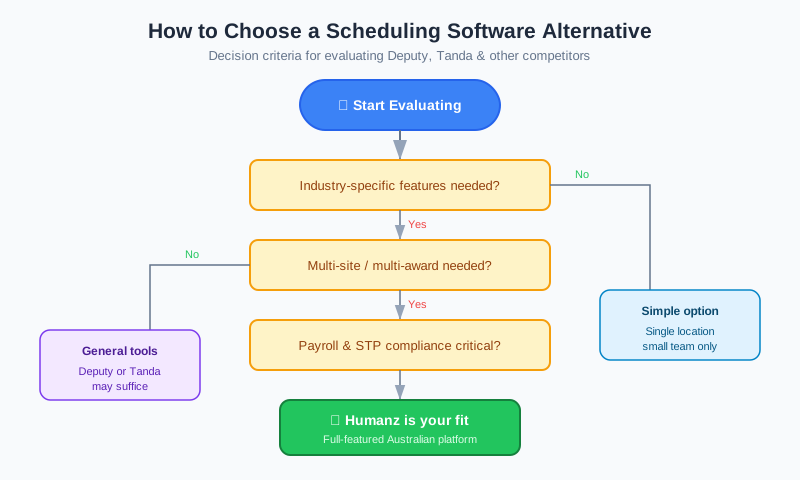
A fair “how to choose” framework
There is no single best tool — there is the best fit for how you operate. A simple way to decide:
- Map your operating model. Single fixed sites with employee-only shifts, or dispersed sites with mixed crews, travel and heavy compliance?
- List your non-negotiables. Subcontractor scheduling, FIFO logistics, compliance gates and fatigue are common deal-breakers for field teams.
- Score each option honestly. Deputy, Tanda, SprintSuite and RapidCrews are all worth shortlisting depending on your needs; rank them against your non-negotiables, not their marketing.
- Test with a real roster. Trial each finalist with a genuine, messy week of your own work.
- Weigh total fit. Local support, Australian industry focus and adoption matter as much as the feature checklist.
If your operating model is fixed-location, shift-based work, a general or hospitality-origin tool may be exactly right. If it is field, trades, mining or drilling, a purpose-built platform usually wins on the points that cost you most.
Where Humanz fits in this comparison
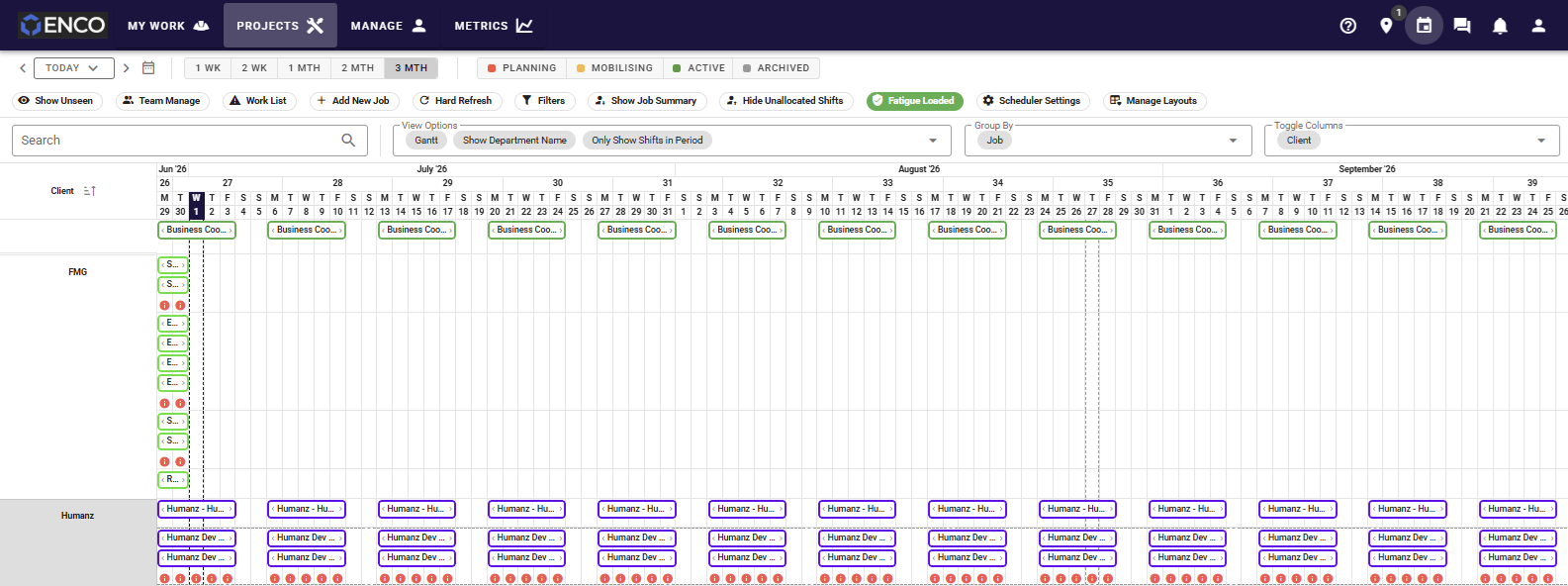
If the friction points above sound like your week, this is the gap Humanz was built to close. Rather than starting life as a venue rostering tool and stretching toward field work, it grew up scheduling dispersed crews — so the very things general platforms tend to bolt on are the things its rostering software built for Australian field teams does in a single screen. That means booking subcontractors and labour-hire in the same roster as your employees across multiple sites, reading live as breakdowns and scope changes move people around the day. Compliance is enforced as you schedule, not flagged afterwards: licence, ticket and induction expiries trigger alerts, and fatigue rules and qualification gates stop the wrong booking before it is confirmed. FIFO and DIDO swing patterns come with flights and accommodation coordinated against the roster, and the day-to-day toolkit — digital timesheets, shift confirmation, custom forms, a document portal, asset tracking, mobilisation, in-app messaging and cross-site analytics — sits in one mobile app that crews actually open on site.
One honest caveat for anyone weighing this against newer tools: Humanz does not ship AI features today. That work is on the roadmap, but the current product earns its place on depth of field workflow, not on automation claims. You can see how we approach field operations on our approach page, or take a wider look at the Humanz platform.
Switching off a general rostering tool and not sure it will hold up to mixed crews, swing rosters and compliance gates? Arrange a walkthrough with the Humanz team — bring your current setup and a real roster, and we’ll map it across live so you can see exactly how it carries over.
Frequently asked questions
Is Humanz a good alternative to Deputy or Tanda?
It depends on your work. Deputy and Tanda are strong, established platforms, particularly for fixed-location, shift-based industries. Humanz is purpose-built for Australian field, trades, mining and construction teams, with native subcontractor scheduling, FIFO logistics and compliance gates at the point of scheduling. If those are your priorities, Humanz is well worth shortlisting alongside them.
What is the main difference between general rostering tools and Humanz?
Many general tools originated in hospitality, retail or healthcare and excel at venue-based shift work. Humanz was built around dispersed field operations — multiple sites, mixed crews of employees and subcontractors, swing rosters, travel and heavy compliance — so those capabilities are native rather than added on.
Can Humanz schedule subcontractors and employees together?
Yes. You can book subbies and labour-hire alongside your own crew in the same roster and the same view, which removes the spreadsheets and separate systems many businesses use to track contractors. See our subcontractor management guide for detail.
Does Humanz handle FIFO rosters and travel?
Yes. Humanz supports swing rosters and lets you coordinate FIFO flights and accommodation against the schedule, so logistics stay tied to the roster rather than managed separately.
How does Humanz help with compliance and fatigue?
Humanz applies compliance gates at scheduling and provides expiry alerts for qualifications, licences and inductions, plus fatigue monitoring. For context on the underlying obligations, the Fair Work Ombudsman is a good place to start.
Is Humanz Australian and does it offer local support?
Yes. Humanz is Australian-built and Australia-supported, in use since 2019 by more than 80 businesses spanning construction, mechanical contracting, mining services, drilling and trades — so the support team understands local awards, conditions and field realities rather than treating them as edge cases.
How hard is it to switch platforms?
Plan for a real migration: export and map your data, run a parallel period for a pay cycle or two, phase the rollout by site or region, and lean on local support during cutover. Done in phases, most field teams move across with minimal disruption. You can also get in touch to talk through your migration.
Related articles
Ready to see Humanz on your own roster?
Free 30-minute walkthrough — we'll use your real crews, sites and shift patterns.